Stay in the loop
Get the latest news, feature updates, and exclusive promotions.

Discover 11 proven marketing automation workflows. Save time, increase ROI, and streamline campaigns with step-by-step templates for SaaS, e-commerce, and more.

Marketing automation workflows help businesses grow by making marketing consistent, efficient, and scalable. They automatically handle repetitive tasks – like sending emails or assigning leads – whenever customers interact with your brand. With the right setup, they streamline operations and create steady revenue.
Many companies still rely on manual processes that limit growth and efficiency. As one Reddit user shared, “One client was spending 3 hours daily manually posting to different social platforms. A simple automation setup cut it to 15 minutes of review time.” (Reddit)
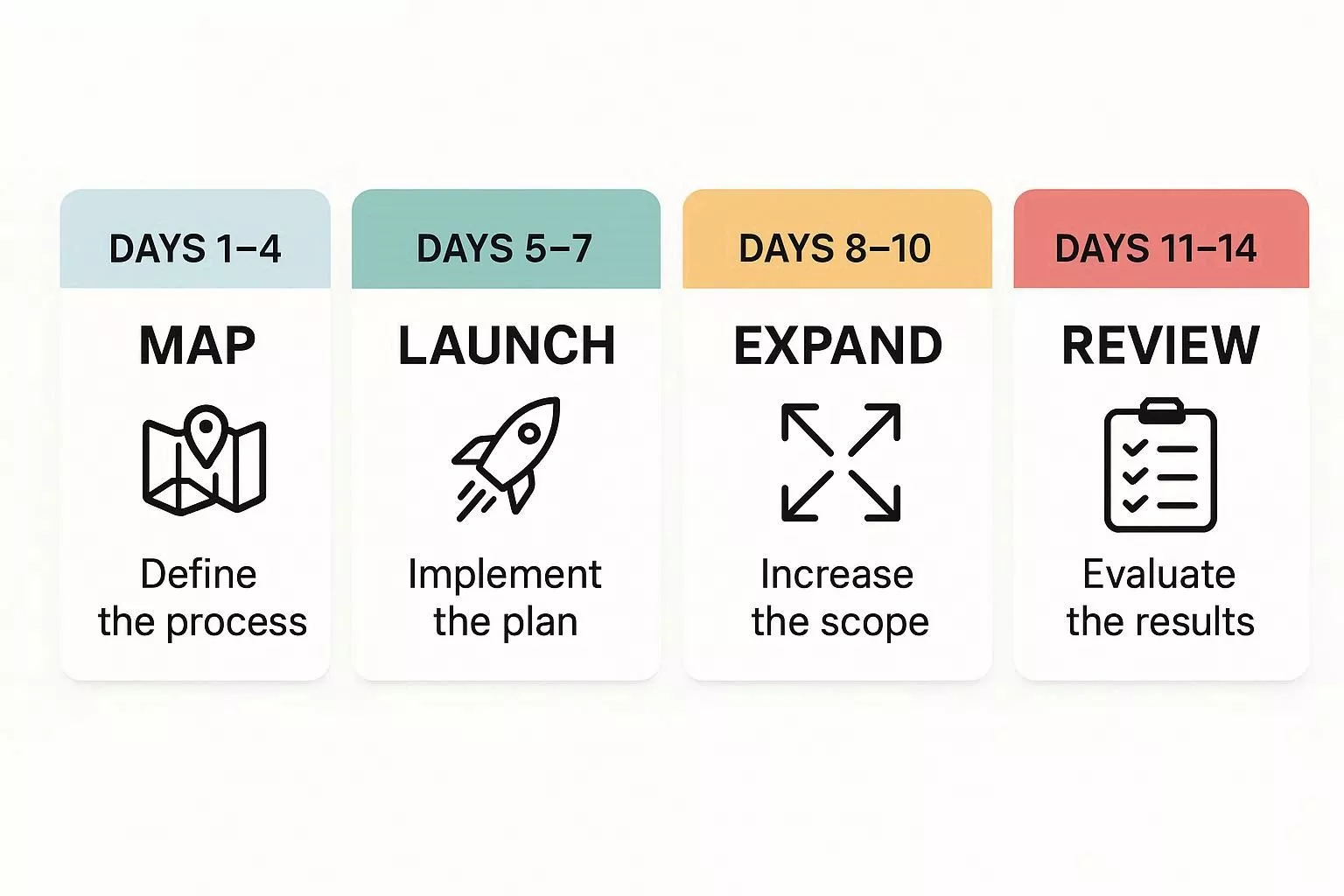
This guide shows how to deploy an effective marketing automation workflow in just 14 days. You’ll learn the core principles, explore 11 tested workflow templates – from onboarding to re-engagement – and see key metrics and pitfalls to avoid.
Follow these steps, and a fully automated, performance-driven marketing system is within reach.
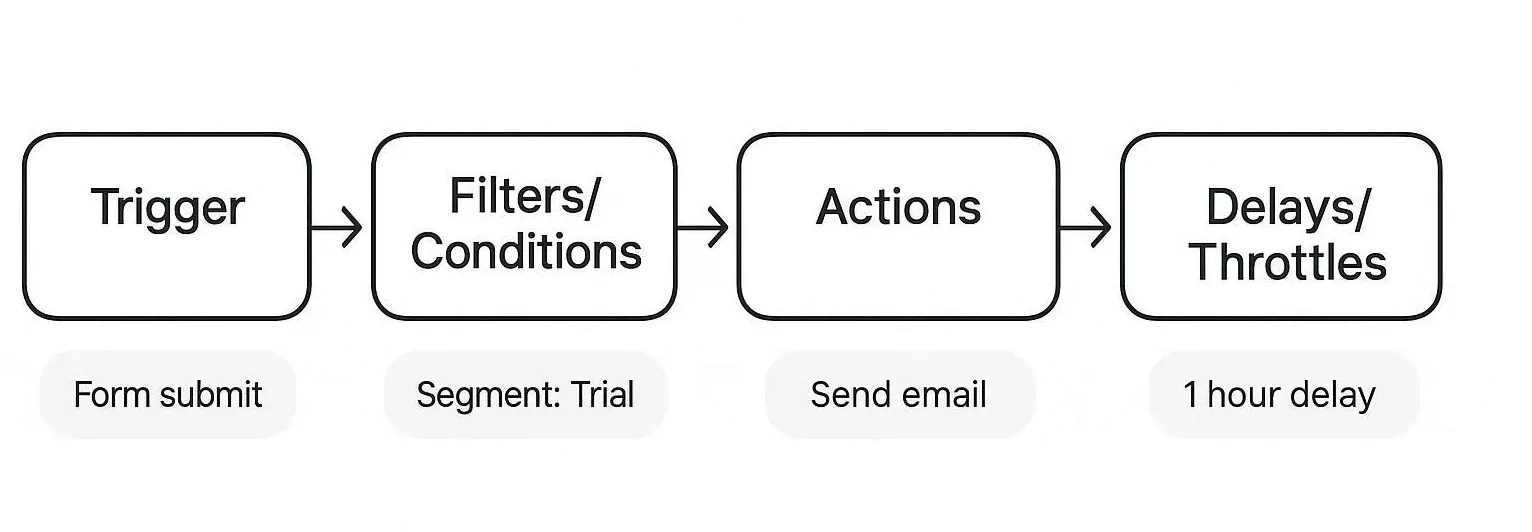
Every workflow needs a trigger, a filter, an action, and a pause. Marketing automation ties these pieces together to handle repetitive marketing tasks for you.
A trigger is what starts the workflow, conditions determine who qualifies, actions are the tasks performed, and delays set the timing. This approach enables you to reach leads and customers with the right messages at the right time, tailored to their actions and characteristics.
Platforms like ActiveCampaign, HubSpot, and Brevo are built on this model. When picking a tool, consider your team’s size, your budget, and which other tools you need to connect. The right choice will fit your business and make your automation much smoother.
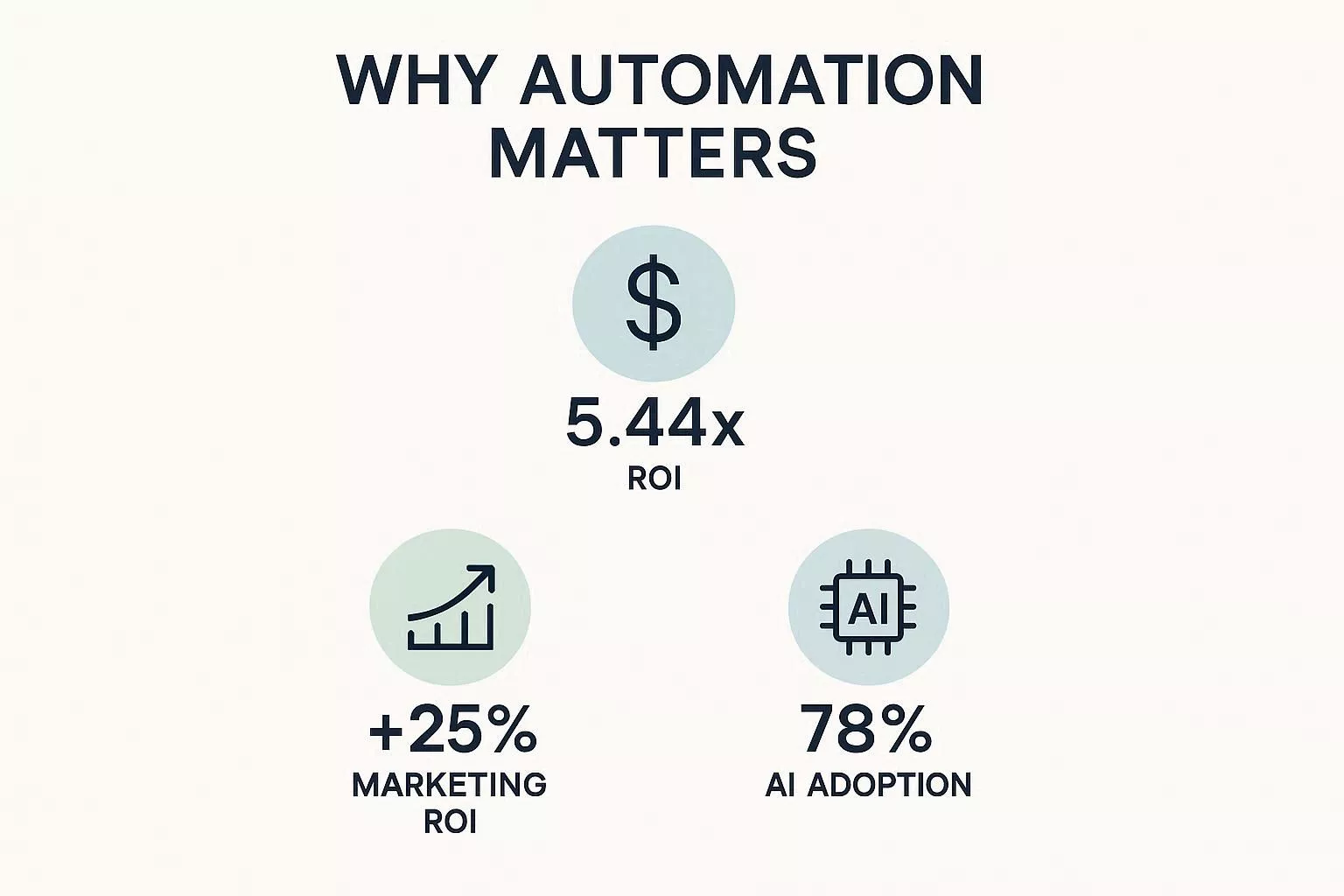
Automation is essential for measurable results. Here are a few helpful benchmarks to consider:
In these contexts, AI is leveraged to automate campaign management, optimize customer targeting, and enhance decision-making processes based on data-driven insights.
Day | Focus Area | Action Steps | Output / KPI |
1 | Identify High-Impact Workflow | Select the highest-frequency, highest-value flow (e.g., Welcome, Trial→Paid, Abandoned Cart) | Workflow chosen, rationale documented |
2 | Map Triggers & Conditions | List all triggers, filters, exit criteria, and required data fields | Trigger & condition map |
3 | Define Actions | Specify emails, SMS, push notifications, ad retargeting, and sales tasks | Action sequence chart |
4 | Set Frequency & Guardrails | Define caps per channel, escalation rules, consent checks | Compliance & frequency plan |
5 | Draft Messaging | Create subject lines, email copy, SMS templates, ad copy | Draft messages ready |
6 | Segment Audience | Apply segmentation rules (e.g., MQL, trial stage, engagement level) | Segmented audience lists |
7 | Configure Platform | Build workflow in chosen tool (HubSpot, ActiveCampaign, Brevo, etc.) | Workflow built |
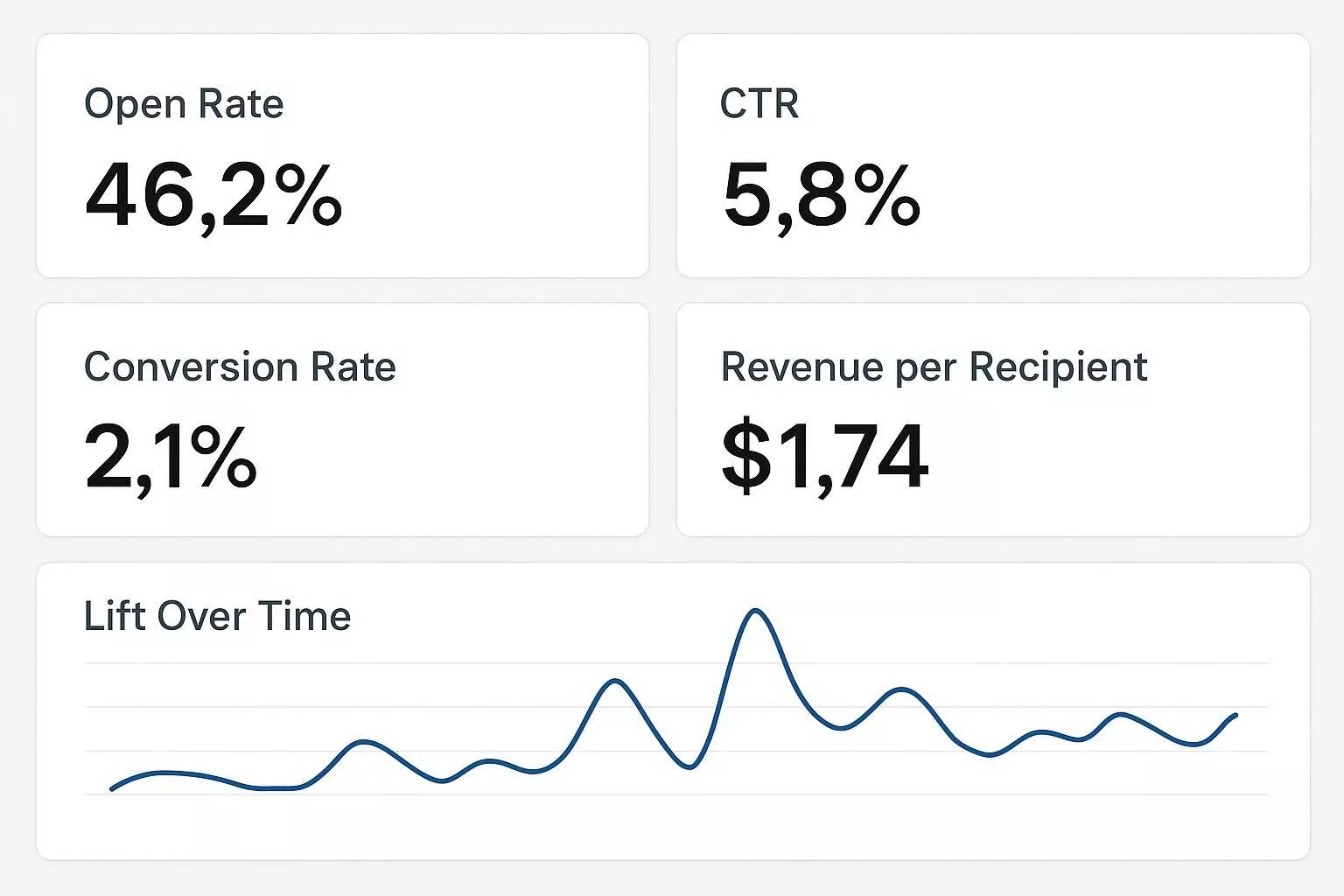
8 | Implement Tracking | Set KPI tracking: open rate, CTR, revenue-per-recipient, conversions | Analytics dashboard ready |
9 | QA & Test | Run internal tests, check triggers, delays, and conditions | QA checklist completed |
10 | Soft Launch | Run workflow on small test cohort (5–10% of contacts) | Test data collected |
11 | Monitor & Adjust | Track KPIs, tweak delays, messaging, and sequence | Optimized workflow |
12 | Expand Audience | Launch workflow to full segment after test validation | Full rollout initiated |
13 | Cross-Channel Escalation | Implement SMS, push, or ad retarget based on decision rules | Multi-channel logic live |
14 | Review & Iterate | Evaluate ROI, conversion lift, and churn reduction; plan next cycle | Final report & action plan |
Here are 11 proven workflows you can implement today. For each template below, you’ll find:
Trigger: Email signup or account creation.
Steps: Welcome email → Product tour → Use-case tips → Invite to webinar/demo → Check-in and NPS.
KPIs: Activation rate, time-to-first-value, 7/14-day retention
Hero Metric: Activation rate – the key to understanding initial user engagement and setup success.
Failure Mode: No tracked activation event.
Trigger: Trial start.
Steps: Onboarding emails → Usage nudges → Trial expiry countdown → Extension offer or sales handoff.
KPIs: Conversion rate, ARR uplift, CAC payback.
Failure Mode: Discount fatigue.
Trigger: MQL score threshold or content download.
Steps: Value emails → Case studies → CTA to book demo → Sales SLA.
KPIs: MQL→SQL conversion, demo attendance.
Failure Mode: Poor lead-scoring.
Trigger: Cart abandoned.
Steps: Reminder email → 24-hour reminder → 3-day winback with discount.
KPIs: Recovery rate, AOV.
Failure Mode: Over-emailing causes deliverability issues.
Trigger: Completed purchase.
Steps: Order confirmation → Delivery confirmation → Review request → Cross-sell.
KPIs: Repeat purchase rate, review conversion.
Failure Mode: Lack of follow-up.
Trigger: Lifetime spend or purchase frequency threshold.
Steps: Exclusive offers → Early access content → Loyalty points nudges.
KPIs: VIP retention, revenue per VIP.
Failure Mode: Ignoring high-value customers.
Trigger: Webinar attendance.
Steps: Thank-you note → On-demand recording → Trial invite → Sales follow-up.
KPIs: Trial signups, demo rate.
Failure Mode: Delayed follow-up.
Trigger: Pricing announcement or usage threshold.
Steps: Informational email → Upgrade path options → Limited-time offers.
KPIs: Upgrade rate, churn risk.
Failure Mode: Lack of communication.
Trigger: Cancellation request or subscription lapse.
Steps: Exit survey → Targeted winback offers → Customer success follow-up.
KPIs: Save rate, churn reduction.
Failure Mode: Ignoring at-risk customers.
Trigger: 90+ days of inactivity.
Steps: “We miss you” mail → Preference center → Final suppression if no response.
KPIs: Reactivation rate, unsubscribe rate.
Failure Mode: Failing to clean inactive contacts.
Trigger: 30 days after onboarding or post-purchase.
Steps: NPS survey → Segmented follow-ups.
KPIs: NPS score, resolution time.
Failure Mode: Ignoring negative feedback.
Review every 4–6 weeks or after a major campaign, allowing for adjustments based on performance.
Yes, small teams can use lightweight tools like Brevo or Zapier to efficiently handle multi-channel workflows.
Aim for 1–3 emails per week per audience segment, adjusting through testing and iteration.
Ensure consent is mapped, proof stored, and opt-outs honored promptly. to remain compliant.
Utilize holdout cohorts – groups not exposed to the automation workflow – as a control, and systematically track key performance indicators such as revenue per recipient. This approach enables a robust evaluation of performance by isolating the incremental impact attributed to the workflow.
Not every business has the budget for enterprise platforms like HubSpot or Salesforce. You can still automate key workflows using free or low-cost tools.

Effective email sequences vary depending on your audience and goals. Here are some proven examples:
Action Tip: Track open rates, click-through rates, and conversions to determine which sequence resonates best for your audience.
Example: Siddhify AI suggests next steps; Acts as an AI assistant.
Overloading emails: Sending too many messages too quickly causes unsubscribes and spam complaints.
Ignoring consent & compliance: GDPR/CCPA violations can occur if you automate without checking opt-ins.
Skipping testing: Launching workflows without A/B tests or holdout groups can hide inefficiencies.
Using generic personalization: Overly broad personalization reduces engagement.
Neglecting monitoring & optimization: Not reviewing KPIs after launch can waste revenue opportunities.
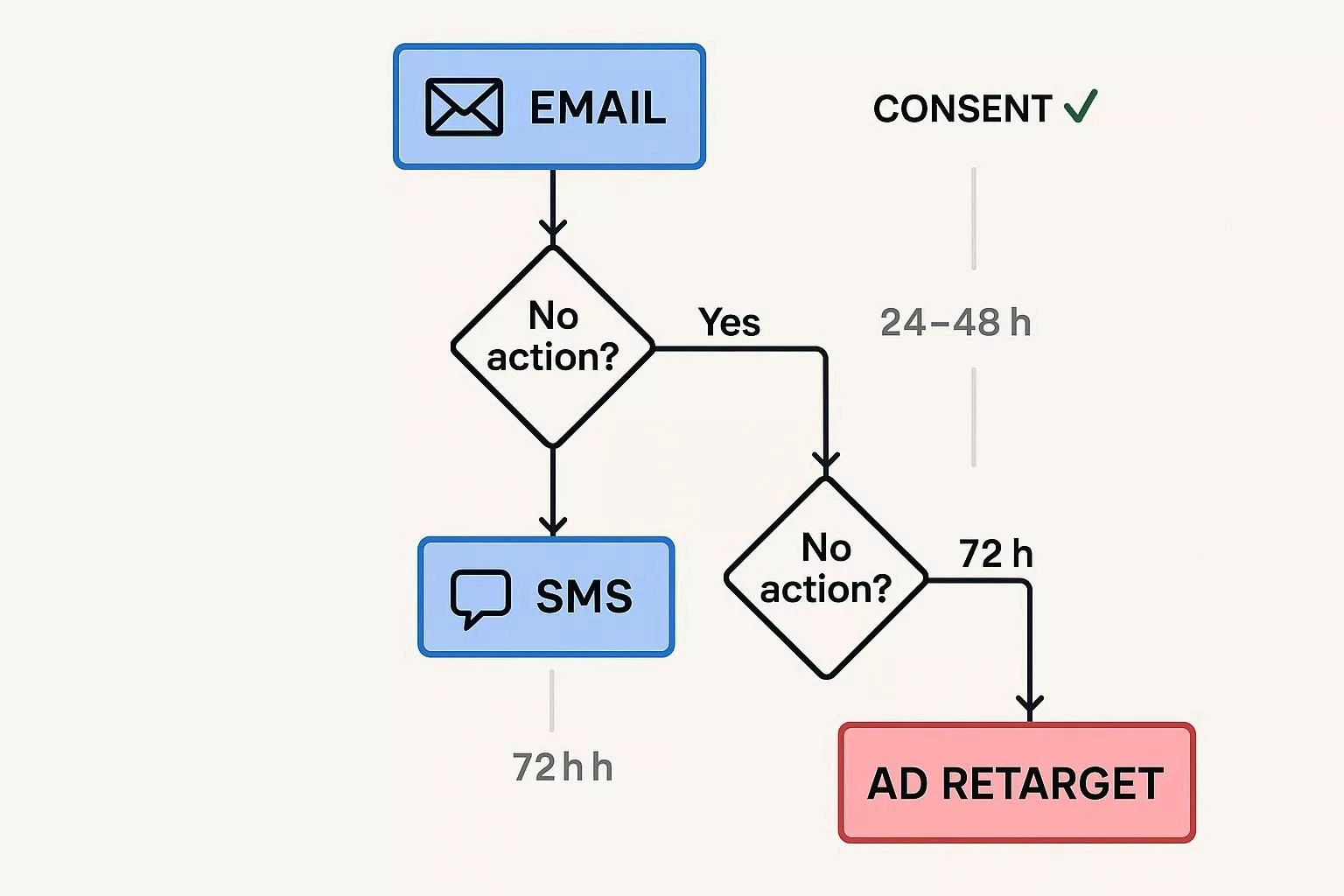
Decision rule example: Send email first → if no action within 24 hours, escalate to SMS (for contacts with consent) → after 72 hours, trigger an ad retarget. This preserves email deliverability and respects user preferences.
Implementation patterns:
“We tried sending emails → SMS → ads in quick succession, but our unsubscribe rates spiked. Adding 24–48 hour spacing fixed the problem.”
Reddit users also echo this sentiment: timing and escalation rules are critical to prevent audience fatigue and spam complaints.
“We tried sending emails → SMS → ads in quick succession, but our unsubscribe rates spiked. Adding 24–48 hour spacing fixed the problem.”
Reddit users also echo this sentiment: timing and escalation rules are critical to prevent audience fatigue and spam complaints.
“Tracking just opens, and clicks don’t show ROI. We switched to revenue-per-recipient metrics and saw real improvements in decision-making.”
Identity resolution and consent mapping require linking customer identities with explicit permissions (e.g., email_marketing_opt_in, sms_opt_in). Integrate consent checks into all workflows to prevent unverified communications. Maintain audit logs to prove compliance with GDPR and CCPA.
Common challenges include inconsistent consent statuses, data sync errors, and fragmented systems — all of which risk unauthorized messaging and legal exposure. Robust mapping, verification, and continuous audits protect both compliance and customer trust by respecting data preferences transparently.
Deliverability best practices: Warm IPs, domain alignment, suppression lists, frequency caps, and monitoring spam complaints. Pause campaigns if deliverability drops. Customers will notice smoother, spam-free experiences, reinforcing your brand’s reliability.
GDPR/CCPA checklist: Store consent proof, honor opt-outs within 24–48 hours, and define data retention in your CDP. Prompt, transparent data handling strengthens confidence in your privacy standards.
“We kept getting spam complaints because our consent mapping was inconsistent across platforms. A unified CDP solved it.”
HubSpot provides detailed migration guidance for B2B SaaS.
“We learned the hard way: duplicated triggers caused hundreds of duplicate emails to go out. Implementing step-level logging saved us.”
(Reddit)
Include multi-channel capability, API/webhook coverage, identity stitching, experimentation support, and compliance features. To assist in evaluating these capabilities, here’s a sample evaluation checklist you might use:
For each feature, apply a scoring system from 1 to 5, with 5 being excellent. For instance, compare Tool A and Tool B on API/Webhook coverage: Tool A scores 4 for its extensive APIs, while Tool B scores 3 for its limited options. This makes the evaluation more actionable for managers.
Automation should reduce cognitive load, not increase it. Tools like Siddhify help teams:
With Siddhify, you can set up weekly workflow reviews, assign experiments to team members, and make sure everyone has time for focused work.
This keeps your team productive and helps prevent burnout. To make the switch to Siddhify and other new tools easier, try running training sessions and starting with small pilot groups. These steps can help your team adjust smoothly and give managers confidence in the new system.
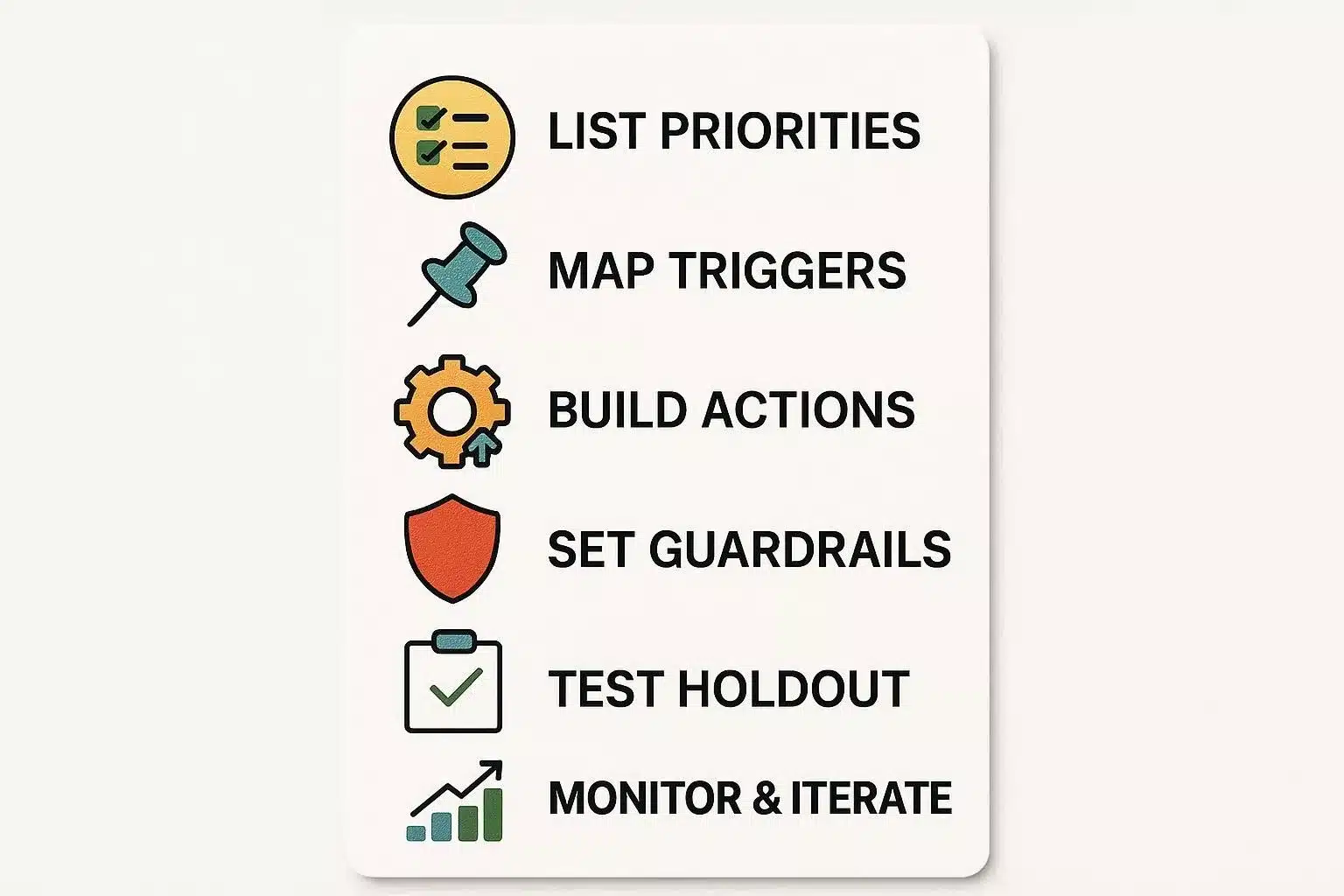
From my experience in marketing, I’ve seen teams turn hours of repetitive work into steady revenue by focusing on the right workflows. Here’s how you can do the same, step by step:
Begin with a simple plan, keep a close eye on your results, and build on what works best for you. The workflows you create now will free up your team’s time for strategy, creativity, and building better relationships with your customers.
A: A rule-based sequence that triggers actions (emails, SMS, CRM updates) after specific events, connecting triggers, conditions, actions, and delays.
A: High-frequency, high-impact flows: welcome/onboarding, trial→paid conversion (SaaS), and abandoned cart (e-commerce).
A: Although implementation costs fluctuate depending on organizational needs and scope, empirical analysis by Nucleus Research indicates that firms realize a mean return on investment of $5.44 for every $1 allocated to marketing automation over three years (Nucleus Research, 2022).
A: Use holdout cohorts (random 10% not exposed) and track conversion, revenue per recipient, and time-to-conversion.
A: Set frequency caps, add suppression windows, check consent flags, and use progressive profiling.
A: Yes – modern stacks support email, SMS, push, webhooks, and ad retargeting with decision trees and consent checks.
A: Inventory workflows, prioritize revenue-critical flows, map triggers/events, rebuild, run parallel validation, and cut over during low-traffic windows.
A: Infinite loops, duplicate messages, missing activation events, and deliverability issues. Implement dedupe logic, monitor KPIs, and create rollback plans.
A: Monitor complaint rates, open rate trends, bounce rates, and inbox placement. Pause sequences and run hygiene campaigns if performance drops.

Join thousands of entrepreneurs and professionals managing their work and life in one place — with the motivational power of gamification built right in.
⚡ Try Siddhify Free TodayNo credit card required · Set up in minutes