

11 Marketing Automation Workflow Proven Templates: Step-by-Step Guide to Save Time & Boost ROI

Why This Matters (and What I’ll Help You Do)
Marketing automation workflows help businesses grow by making marketing consistent, efficient, and scalable. They automatically handle repetitive tasks – like sending emails or assigning leads – whenever customers interact with your brand. With the right setup, they streamline operations and create steady revenue.
Many companies still rely on manual processes that limit growth and efficiency. As one Reddit user shared, “One client was spending 3 hours daily manually posting to different social platforms. A simple automation setup cut it to 15 minutes of review time.” (Reddit)
This guide shows how to deploy an effective marketing automation workflow in just 14 days. You’ll learn the core principles, explore 11 tested workflow templates – from onboarding to re-engagement – and see key metrics and pitfalls to avoid.
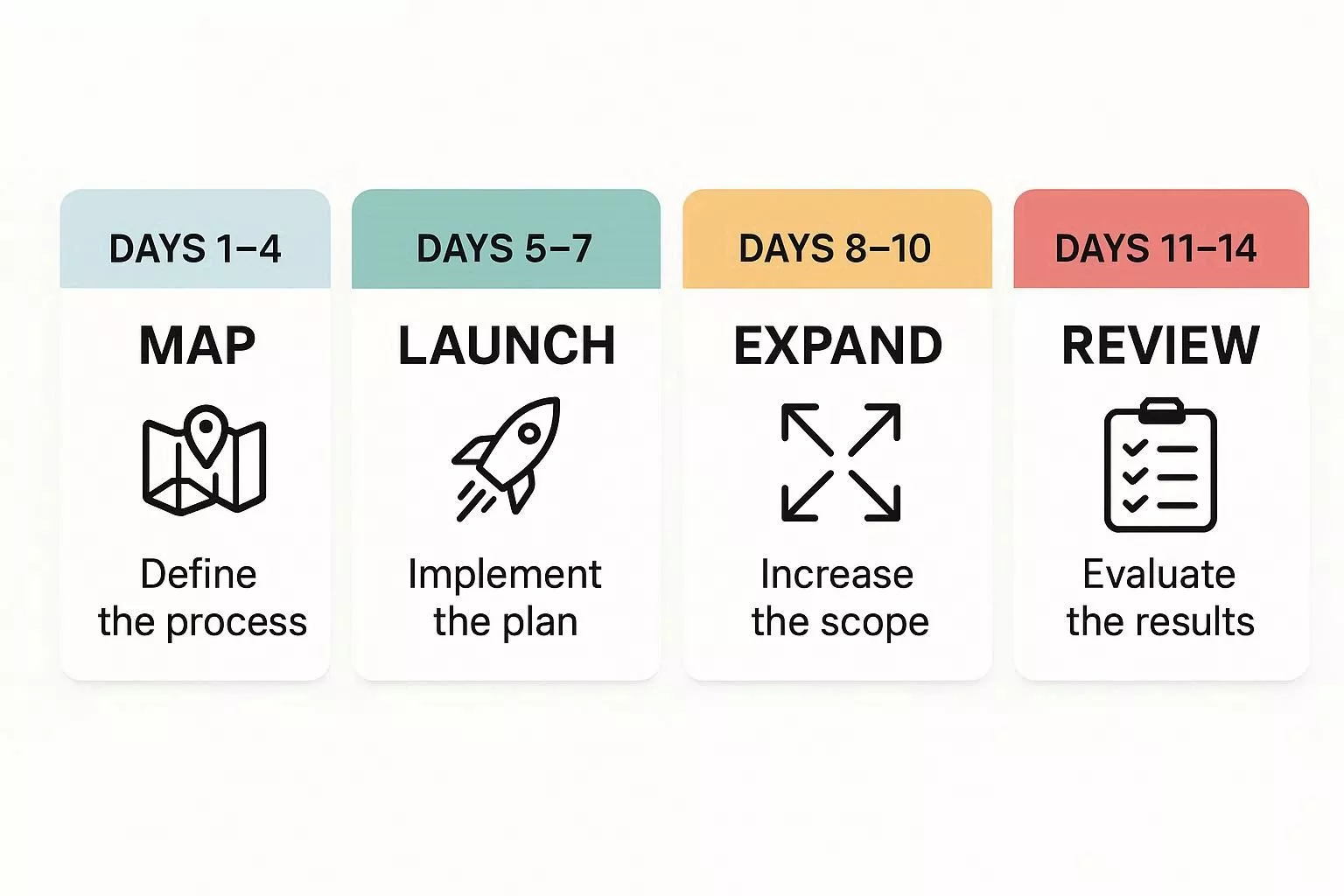
14-Day Rollout Overview:
- Days 1–4: Map triggers, conditions, and exit criteria.
- Days 5–7: Launch and test initial workflows.
- Days 8–10: Expand across multiple channels.
- Days 11–14: Review results, optimize, and finalize deployment.
Follow these steps, and a fully automated, performance-driven marketing system is within reach.
What Is a Marketing Automation Workflow?
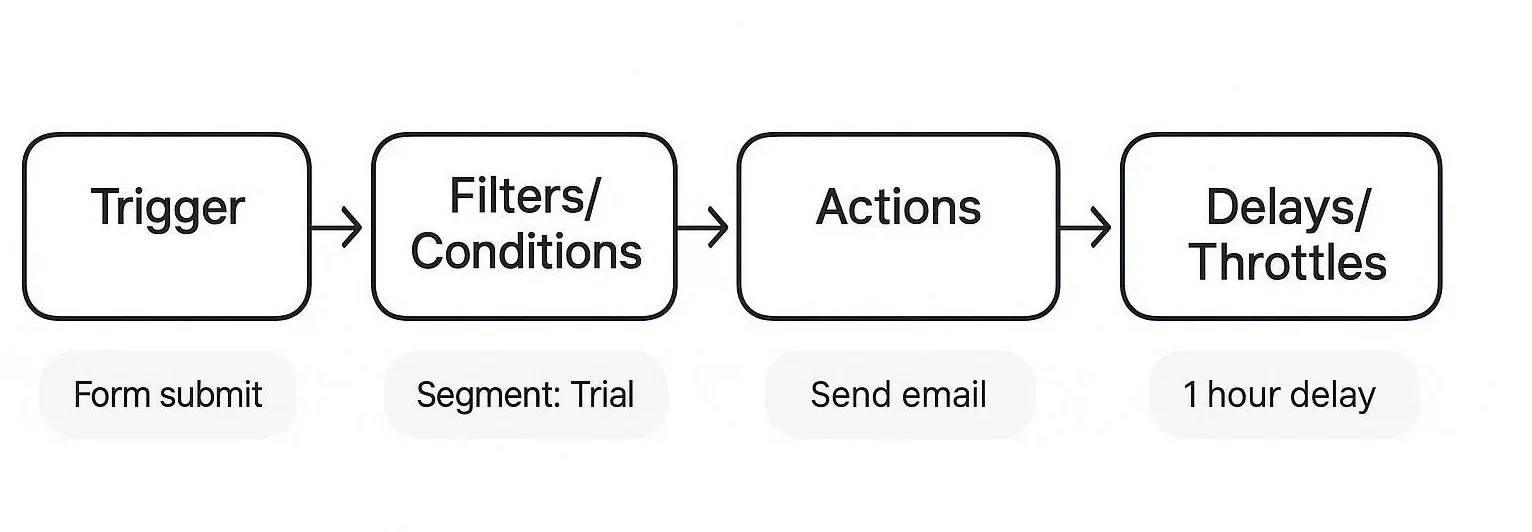
Every workflow needs a trigger, a filter, an action, and a pause. Marketing automation ties these pieces together to handle repetitive marketing tasks for you.
A trigger is what starts the workflow, conditions determine who qualifies, actions are the tasks performed, and delays set the timing. This approach enables you to reach leads and customers with the right messages at the right time, tailored to their actions and characteristics.
- Trigger: The event that starts the workflow (e.g., form submit, purchase, tag change).
- Conditions/Filters: Criteria that qualify the contact (e.g., segment, country, consent).
- Actions: Tasks to perform (e.g., send email, update CRM, push to sales).
- Delays & Throttles: Timing rules to avoid message spam.
- Exit Criteria: Conditions under which the contact exits the flow.
Platforms like ActiveCampaign, HubSpot, and Brevo are built on this model. When picking a tool, consider your team’s size, your budget, and which other tools you need to connect. The right choice will fit your business and make your automation much smoother.
Why Automation Workflows Matter: ROI & Outcomes
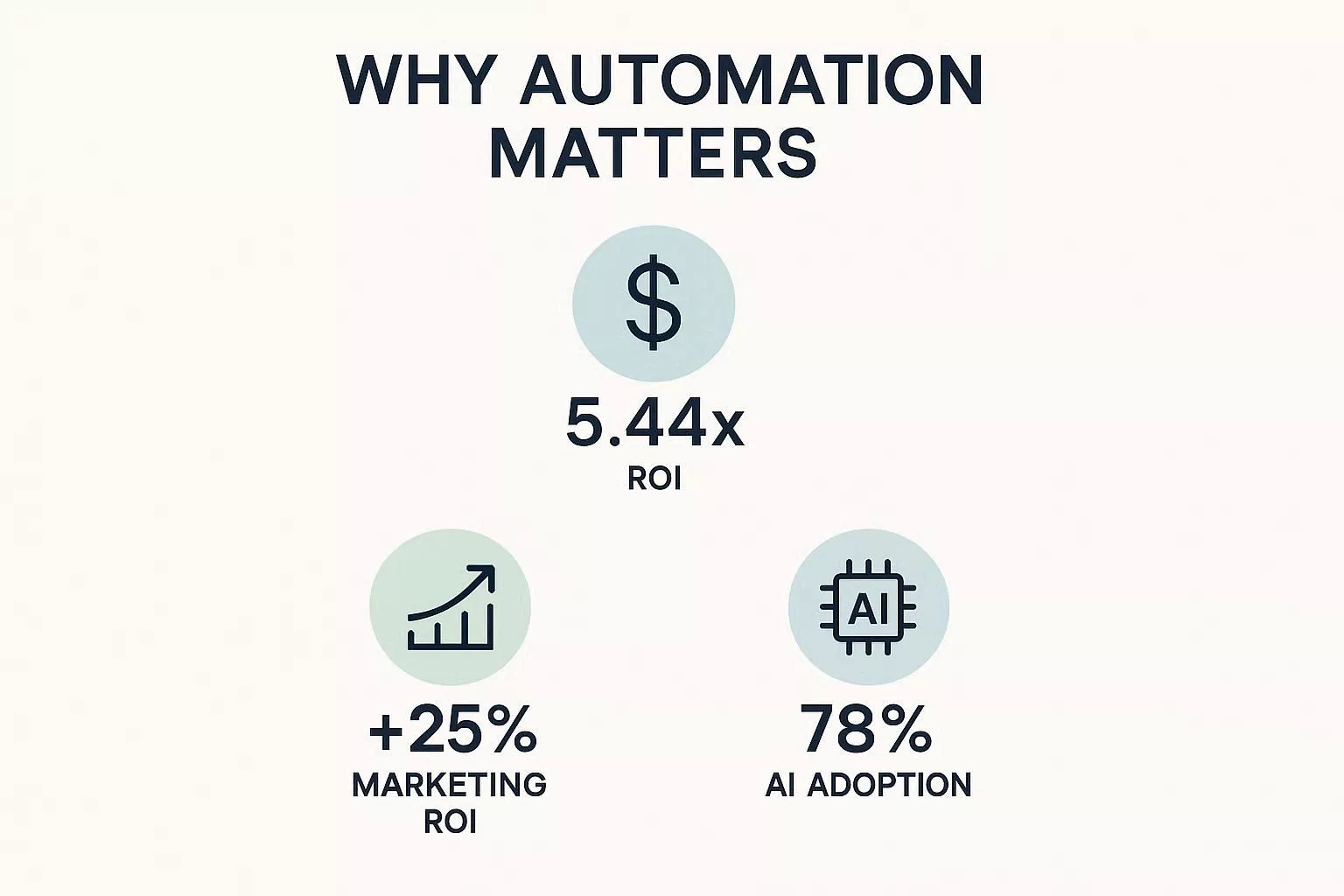
Automation is essential for measurable results. Here are a few helpful benchmarks to consider:
- Dollar ROI: On average, companies earn $5.44 for every $1 they spend over three years (Nucleus Research). To estimate your own potential, multiply your recent marketing spend by 5.44. This quick calculation can show you the possible payoff and help you focus your marketing efforts.
- % Lift in Marketing ROI: Salesforce reports a 25% average increase in marketing ROI after adopting CRM/automation tools.
- AI Integration and Optimization: McKinsey reports that 78% of organizations have adopted artificial intelligence technologies within at least one business domain, with marketing and sales representing some of the most prevalent applications.
In these contexts, AI is leveraged to automate campaign management, optimize customer targeting, and enhance decision-making processes based on data-driven insights.
Core Principles of Effective Marketing Automation
- Data-First Design: Build workflows around a single customer view.
- Customer-Centric Timing & Frequency Rules: Respect frequency caps per channel and use escalation windows for cross-channel touches.
- Personalization Without Creepiness: Personalize based on clear, transparent data and avoid overly granular behavioral prediction.
14-Day Automation Workflow Sprint: Step-by-Step Guide
Day | Focus Area | Action Steps | Output / KPI |
1 | Identify High-Impact Workflow | Select the highest-frequency, highest-value flow (e.g., Welcome, Trial→Paid, Abandoned Cart) | Workflow chosen, rationale documented |
2 | Map Triggers & Conditions | List all triggers, filters, exit criteria, and required data fields | Trigger & condition map |
3 | Define Actions | Specify emails, SMS, push notifications, ad retargeting, and sales tasks | Action sequence chart |
4 | Set Frequency & Guardrails | Define caps per channel, escalation rules, consent checks | Compliance & frequency plan |
5 | Draft Messaging | Create subject lines, email copy, SMS templates, ad copy | Draft messages ready |
6 | Segment Audience | Apply segmentation rules (e.g., MQL, trial stage, engagement level) | Segmented audience lists |
7 | Configure Platform | Build workflow in chosen tool (HubSpot, ActiveCampaign, Brevo, etc.) | Workflow built |
8 | Implement Tracking | Set KPI tracking: open rate, CTR, revenue-per-recipient, conversions | Analytics dashboard ready |
9 | QA & Test | Run internal tests, check triggers, delays, and conditions | QA checklist completed |
10 | Soft Launch | Run workflow on small test cohort (5–10% of contacts) | Test data collected |
11 | Monitor & Adjust | Track KPIs, tweak delays, messaging, and sequence | Optimized workflow |
12 | Expand Audience | Launch workflow to full segment after test validation | Full rollout initiated |
13 | Cross-Channel Escalation | Implement SMS, push, or ad retarget based on decision rules | Multi-channel logic live |
14 | Review & Iterate | Evaluate ROI, conversion lift, and churn reduction; plan next cycle | Final report & action plan |
Marketing Automation Workflow Examples: 11 Proven Templates
Here are 11 proven workflows you can implement today. For each template below, you’ll find:
- Quick summary
- Triggers
- Steps
- Sample messaging ideas
- KPIs
- Common failure modes
- Cross-channel variants
1. Welcome/Onboarding Sequence (SaaS & Content)
Trigger: Email signup or account creation.
Steps: Welcome email → Product tour → Use-case tips → Invite to webinar/demo → Check-in and NPS.
KPIs: Activation rate, time-to-first-value, 7/14-day retention
Hero Metric: Activation rate – the key to understanding initial user engagement and setup success.
Failure Mode: No tracked activation event.
2. Free-Trial → Paid Conversion (SaaS)
Trigger: Trial start.
Steps: Onboarding emails → Usage nudges → Trial expiry countdown → Extension offer or sales handoff.
KPIs: Conversion rate, ARR uplift, CAC payback.
Failure Mode: Discount fatigue.
3. Lead-Nurture → Demo Booking (B2B)
Trigger: MQL score threshold or content download.
Steps: Value emails → Case studies → CTA to book demo → Sales SLA.
KPIs: MQL→SQL conversion, demo attendance.
Failure Mode: Poor lead-scoring.
4. Abandoned Cart & Recovery (E-commerce)
Trigger: Cart abandoned.
Steps: Reminder email → 24-hour reminder → 3-day winback with discount.
KPIs: Recovery rate, AOV.
Failure Mode: Over-emailing causes deliverability issues.
5. Post-Purchase Lifecycle (Cross-sell/Review Request)
Trigger: Completed purchase.
Steps: Order confirmation → Delivery confirmation → Review request → Cross-sell.
KPIs: Repeat purchase rate, review conversion.
Failure Mode: Lack of follow-up.
6. VIP/Loyalty Trigger Campaigns
Trigger: Lifetime spend or purchase frequency threshold.
Steps: Exclusive offers → Early access content → Loyalty points nudges.
KPIs: VIP retention, revenue per VIP.
Failure Mode: Ignoring high-value customers.
7. Event Follow-Up (Webinar → Trial → Sales)
Trigger: Webinar attendance.
Steps: Thank-you note → On-demand recording → Trial invite → Sales follow-up.
KPIs: Trial signups, demo rate.
Failure Mode: Delayed follow-up.
8. Pricing Change/Upsell Nudges
Trigger: Pricing announcement or usage threshold.
Steps: Informational email → Upgrade path options → Limited-time offers.
KPIs: Upgrade rate, churn risk.
Failure Mode: Lack of communication.
9. Winback & Churn Prevention
Trigger: Cancellation request or subscription lapse.
Steps: Exit survey → Targeted winback offers → Customer success follow-up.
KPIs: Save rate, churn reduction.
Failure Mode: Ignoring at-risk customers.
10. Re-engagement & List Hygiene
Trigger: 90+ days of inactivity.
Steps: “We miss you” mail → Preference center → Final suppression if no response.
KPIs: Reactivation rate, unsubscribe rate.
Failure Mode: Failing to clean inactive contacts.
11. Feedback & NPS Automation
Trigger: 30 days after onboarding or post-purchase.
Steps: NPS survey → Segmented follow-ups.
KPIs: NPS score, resolution time.
Failure Mode: Ignoring negative feedback.
People Also Ask
1. How often should workflows be reviewed?
Review every 4–6 weeks or after a major campaign, allowing for adjustments based on performance.
2. Can small teams manage multi-channel workflows?
Yes, small teams can use lightweight tools like Brevo or Zapier to efficiently handle multi-channel workflows.
3. What’s the ideal email cadence?
Aim for 1–3 emails per week per audience segment, adjusting through testing and iteration.
4. How do GDPR/CCPA impact automation?
Ensure consent is mapped, proof stored, and opt-outs honored promptly. to remain compliant.
5. How can incremental lift be accurately measured?
Utilize holdout cohorts – groups not exposed to the automation workflow – as a control, and systematically track key performance indicators such as revenue per recipient. This approach enables a robust evaluation of performance by isolating the incremental impact attributed to the workflow.
How to Integrate Workflows with Low-Budget or Free Tools
Not every business has the budget for enterprise platforms like HubSpot or Salesforce. You can still automate key workflows using free or low-cost tools.
Tips for Low-Budget Integration:
- Use free versions of automation platforms: Tools like Brevo (formerly Sendinblue), MailerLite, and HubSpot Free CRM allow basic email sequences, contact segmentation, and reporting. These tools help streamline communication efforts without significant financial investment.
- Combine lightweight tools with Zapier or n8n to connect apps like Google Sheets, Gmail, or Slack, automating notifications, task assignments, or email follow-ups without coding.
- Focus on high-impact workflows first: Start with welcome emails, abandoned cart recovery, or trial-to-paid conversion flows to maximize ROI while keeping costs low.
Example Workflow:
- Google Form → Zapier → Gmail: Automatically sends a welcome email to new signups.
- Siddhify → Zapier → Slack: This setup notifies the sales team of new leads for manual follow-up.
Examples of High-Performing Email Sequences by Industry
Effective email sequences vary depending on your audience and goals. Here are some proven examples:
SaaS / B2B:
- Welcome & Onboarding: Email 1: Welcome + product intro → Email 2: Tips & best practices → Email 3: Case study → Email 4: Demo/CTA.
- Trial-to-Paid Conversion: Email 1: Feature highlight → Email 2: Usage tips → Email 3: Personalized offer → Email 4: Deadline reminder.
E-commerce:
- Abandoned Cart Recovery: Email 1: Reminder → Email 2: Discount offer → Email 3: Social proof or urgency.
- Post-Purchase Upsell: Email 1: Order confirmation → Email 2: Review request → Email 3: Complementary product offer.
Nonprofit / Content Marketing:
- Welcome Series: Email 1: Mission intro → Email 2: Top resources → Email 3: Invitation to webinar or community.
- Donation Nurture: Email 1: Thank you → Email 2: Impact story → Email 3: Call to recurring support.
Action Tip: Track open rates, click-through rates, and conversions to determine which sequence resonates best for your audience.
Beginner Mistakes to Avoid When Implementing Automation
- Auto task creation & prioritization
- Predictive deadline suggestions
- Workflow automation
Example: Siddhify AI suggests next steps; Acts as an AI assistant.
Common Pitfalls:
Overloading emails: Sending too many messages too quickly causes unsubscribes and spam complaints.
- Tip: Respect frequency caps and test escalation delays.
Ignoring consent & compliance: GDPR/CCPA violations can occur if you automate without checking opt-ins.
- Tip: Always verify consent flags before triggering emails or SMS.
Skipping testing: Launching workflows without A/B tests or holdout groups can hide inefficiencies.
- Tip: Run a 10% holdout cohort to measure real incremental lift.
Using generic personalization: Overly broad personalization reduces engagement.
- Tip: Segment audiences and use clear, relevant data points (e.g., product purchased, trial plan).
Neglecting monitoring & optimization: Not reviewing KPIs after launch can waste revenue opportunities.
- Tip: Set a weekly dashboard review for open rates, conversions, and revenue per recipient.
Cross-Channel Orchestration: Building an Omnichannel Workflow
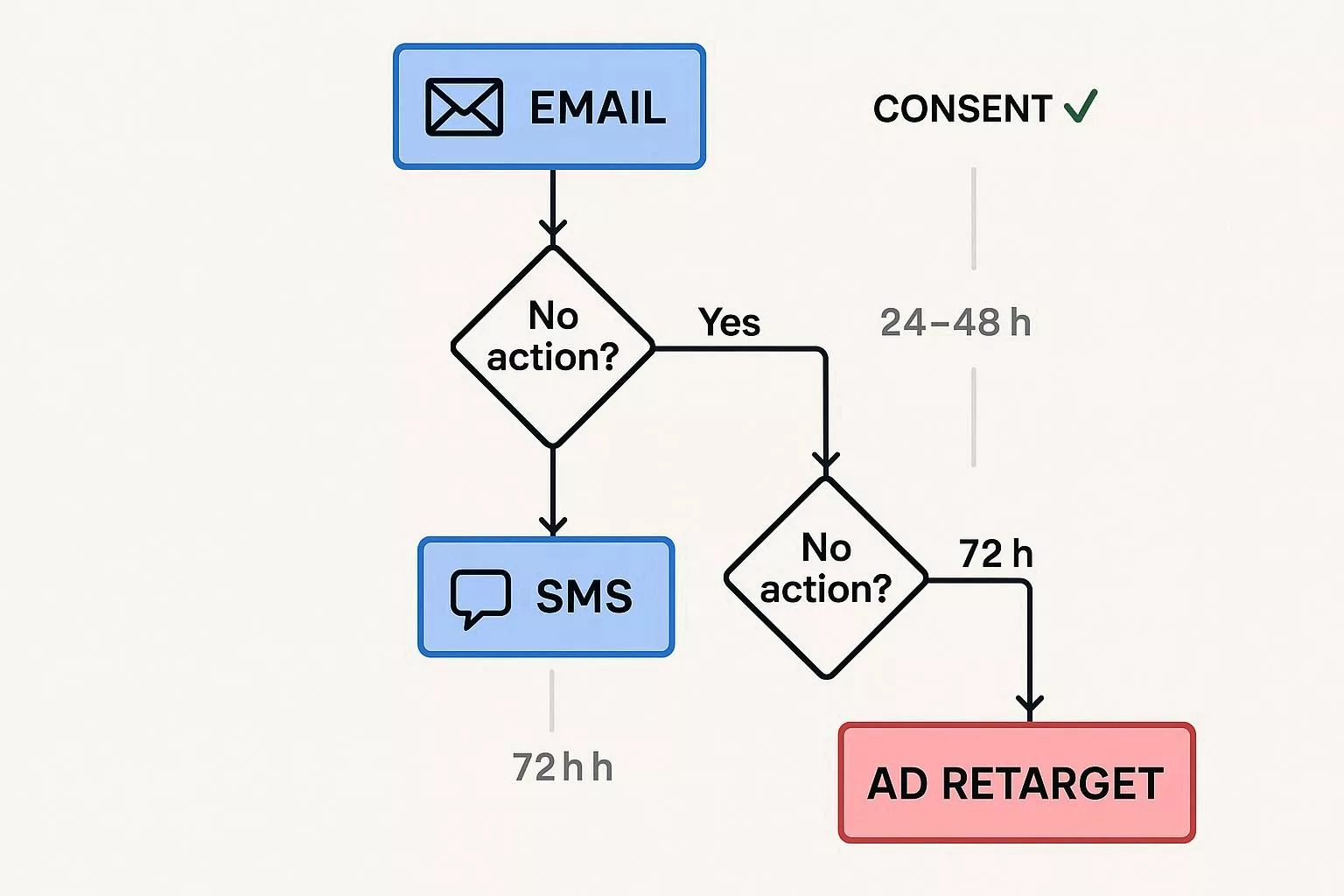
Decision rule example: Send email first → if no action within 24 hours, escalate to SMS (for contacts with consent) → after 72 hours, trigger an ad retarget. This preserves email deliverability and respects user preferences.
Implementation patterns:
- Native orchestration — Use a single platform with channel support for easier governance.
- Event-driven stack — CDP / event bus + channel executors; ideal for scale.
- Tool-orchestration (Zapier / n8n) — Quick setup for small teams, though it may become brittle at scale.
A marketer on Quora shared:
“We tried sending emails → SMS → ads in quick succession, but our unsubscribe rates spiked. Adding 24–48 hour spacing fixed the problem.”
Reddit users also echo this sentiment: timing and escalation rules are critical to prevent audience fatigue and spam complaints.
Testing, Measurement & Attribution
How to design a holdout experiment:
“We tried sending emails → SMS → ads in quick succession, but our unsubscribe rates spiked. Adding 24–48 hour spacing fixed the problem.”
Reddit users also echo this sentiment: timing and escalation rules are critical to prevent audience fatigue and spam complaints.
A/B test vs holdout:
- A/B test: Compares small changes inside the flow (e.g., subject line, CTA).
- Holdout cohort: Measures the full journey incremental lift; it is recommended to prove workflow ROI.
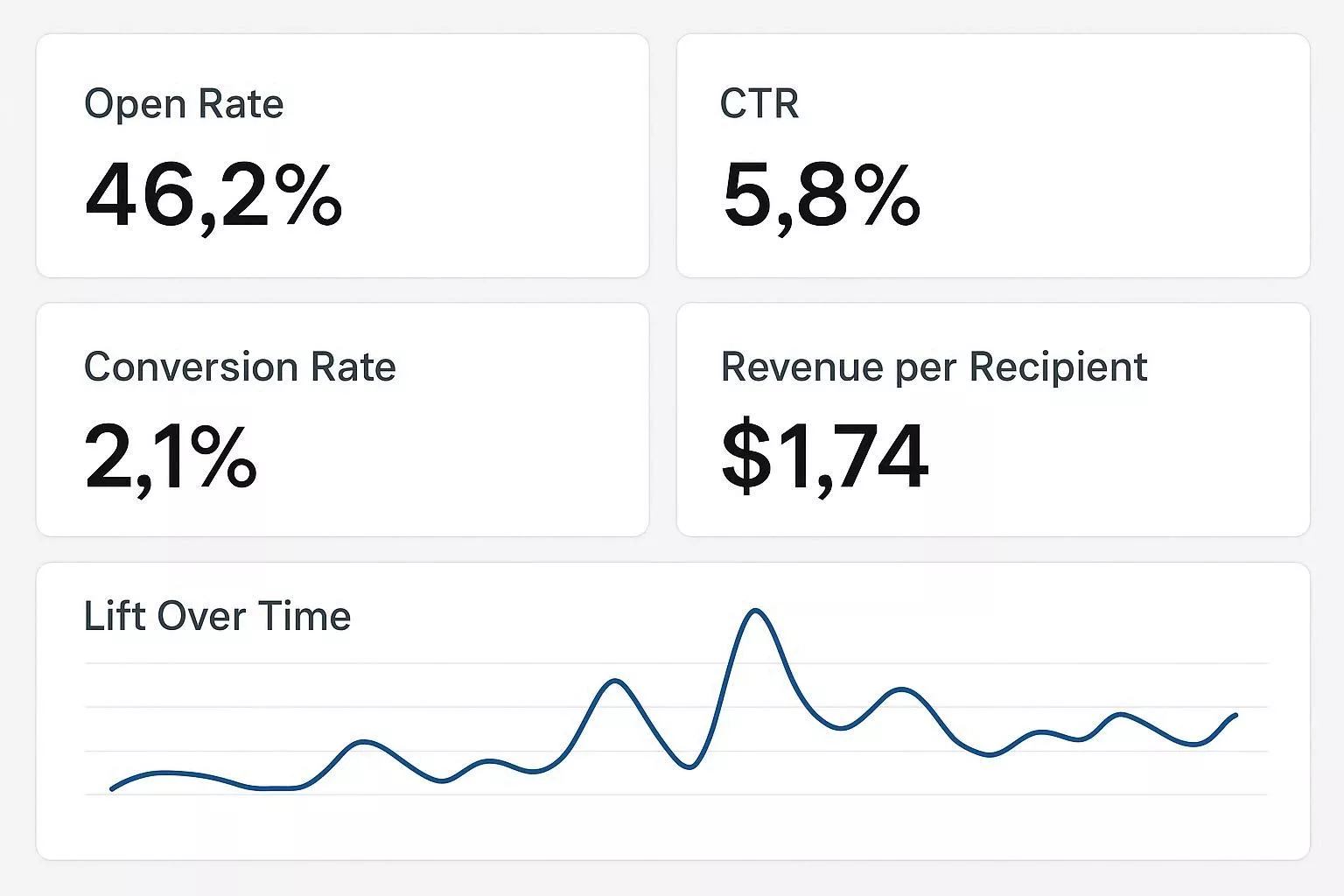
- Dashboard KPIs: Open rate, CTR, conversion rate, revenue per recipient, incremental revenue, churn rate. Build these into a single KPI dashboard and report weekly during initial rollout.
“Tracking just opens, and clicks don’t show ROI. We switched to revenue-per-recipient metrics and saw real improvements in decision-making.”
Data, Privacy & Deliverability (Operational Guardrails)
Identity resolution and consent mapping require linking customer identities with explicit permissions (e.g., email_marketing_opt_in, sms_opt_in). Integrate consent checks into all workflows to prevent unverified communications. Maintain audit logs to prove compliance with GDPR and CCPA.
Common challenges include inconsistent consent statuses, data sync errors, and fragmented systems — all of which risk unauthorized messaging and legal exposure. Robust mapping, verification, and continuous audits protect both compliance and customer trust by respecting data preferences transparently.
Deliverability best practices: Warm IPs, domain alignment, suppression lists, frequency caps, and monitoring spam complaints. Pause campaigns if deliverability drops. Customers will notice smoother, spam-free experiences, reinforcing your brand’s reliability.
GDPR/CCPA checklist: Store consent proof, honor opt-outs within 24–48 hours, and define data retention in your CDP. Prompt, transparent data handling strengthens confidence in your privacy standards.
“We kept getting spam complaints because our consent mapping was inconsistent across platforms. A unified CDP solved it.”
Migration & Scaling Playbook (Enterprise-Style)
Steps for migrating workflows (HubSpot style):
- Prioritize revenue-critical flows first: trial conversion, abandoned cart, sales handoff.
- Rebuild in the new platform and run parallel tests to ensure parity.
- Cut over during low-traffic windows.
- Monitor KPIs closely post-cutover.
HubSpot provides detailed migration guidance for B2B SaaS.
Common troubleshooting & failure modes:
- Infinite loops: Audit triggers that re-trigger on field updates; add dedupe checks.
- Duplicate messages: Ensure unique message keys and dedupe logic.
- Spam complaints / low deliverability: Pause sequences and run re-permission campaigns.
- Missing data: Add guardrails so workflows only run if key fields exist.
“We learned the hard way: duplicated triggers caused hundreds of duplicate emails to go out. Implementing step-level logging saved us.”
(Reddit)
Choosing the Right Tools (Vendor-Fit Checklist)
- Small team: Templates, easy UI, affordable pricing (Brevo, AWeber).
- Growing SaaS: Trial→conversion flows, CRM sync (ActiveCampaign, Klaviyo).
- Enterprise: CDP + orchestration + experimentation (HubSpot, Iterable, Salesforce).
Include multi-channel capability, API/webhook coverage, identity stitching, experimentation support, and compliance features. To assist in evaluating these capabilities, here’s a sample evaluation checklist you might use:
- Multi-channel capability: Does the tool support email, SMS, push notifications, webhooks, and ad retargeting?
- API/Webhook coverage: How extensive are the API endpoints and webhook functionalities?
- Identity stitching: Can the tool consolidate customer data across multiple touchpoints?
- Experimentation support: Does it provide A/B testing and holdout features?
- Compliance features: Are there built-in GDPR/CCPA compliance tools?
For each feature, apply a scoring system from 1 to 5, with 5 being excellent. For instance, compare Tool A and Tool B on API/Webhook coverage: Tool A scores 4 for its extensive APIs, while Tool B scores 3 for its limited options. This makes the evaluation more actionable for managers.
3 Mini Case Studies (Evidence-Backed)
- SaaS trial → paid conversion: HubSpot migrations improved demo conversions by prioritizing revenue flows first.
- E-commerce abandoned cart lift: Brevo and ActiveCampaign recover 5–15% of abandoned cart AOV, depending on offer cadence.
- ROI playbook: Nucleus Research shows $5.44 ROI per $1 invested in marketing automation – a benchmark for forecasting revenue impact.
How Siddhify Fits (Balanced Productivity + Automation)
Automation should reduce cognitive load, not increase it. Tools like Siddhify help teams:
- Schedule review windows
- Guard active focus time
- Track well-being while automations handle repetitive tasks
With Siddhify, you can set up weekly workflow reviews, assign experiments to team members, and make sure everyone has time for focused work.
This keeps your team productive and helps prevent burnout. To make the switch to Siddhify and other new tools easier, try running training sessions and starting with small pilot groups. These steps can help your team adjust smoothly and give managers confidence in the new system.
Conclusion: 3-Step Action Plan
From my experience in marketing, I’ve seen teams turn hours of repetitive work into steady revenue by focusing on the right workflows. Here’s how you can do the same, step by step:
- Select your workflow: Choose the workflow with the highest impact and frequency, such as welcome or trial conversion.
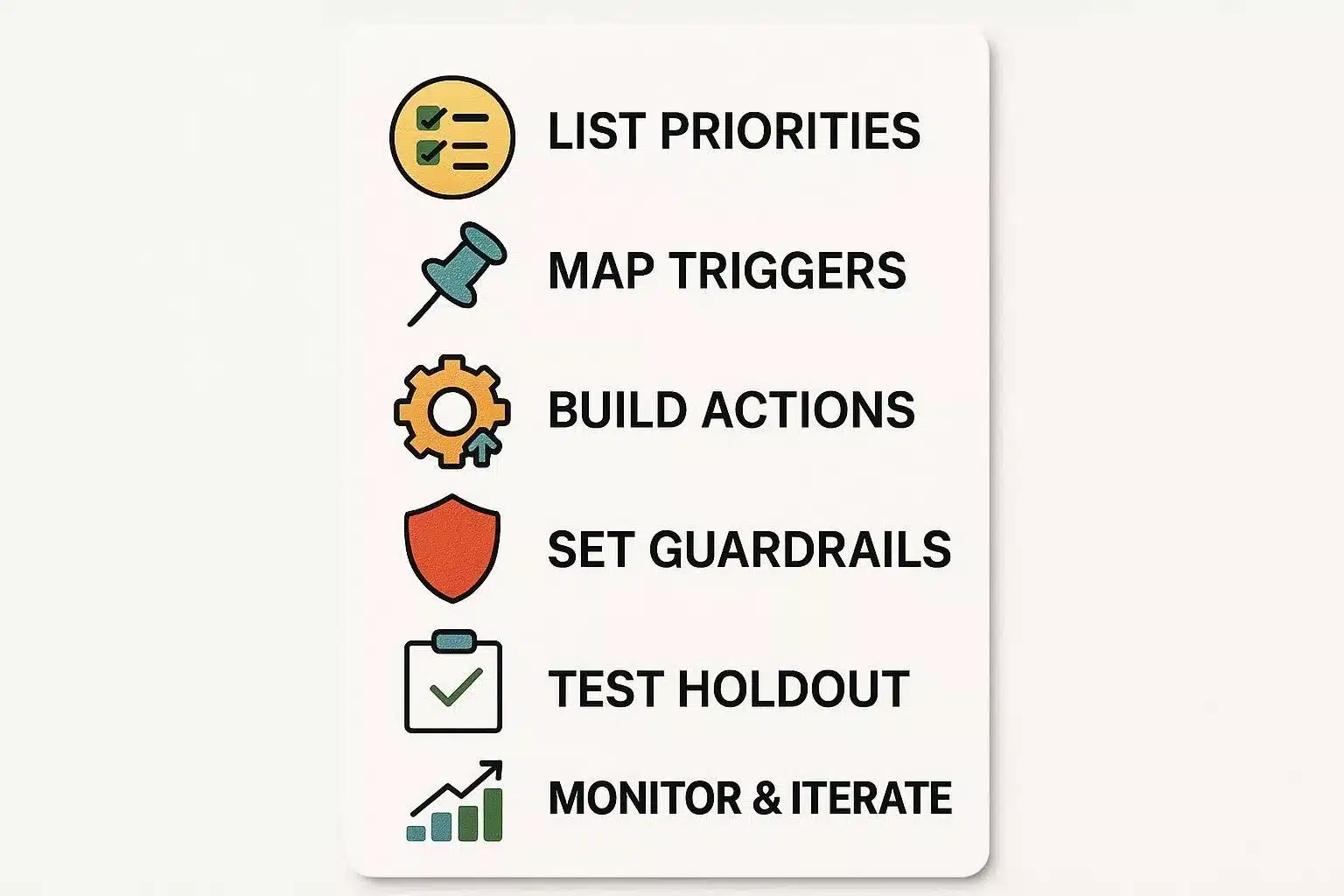
- Structure and guardrail setup (days 1–4): Map triggers, conditions, consent checks, and exit criteria. Develop a solid test plan.
- Scale up, test, roll, and measure (days 5–14): Run a holdout study, monitor KPIs, iterate, and implement cross-channel escalation after the first 7 days if your team is small.
Begin with a simple plan, keep a close eye on your results, and build on what works best for you. The workflows you create now will free up your team’s time for strategy, creativity, and building better relationships with your customers.
FAQs
A: A rule-based sequence that triggers actions (emails, SMS, CRM updates) after specific events, connecting triggers, conditions, actions, and delays.
A: High-frequency, high-impact flows: welcome/onboarding, trial→paid conversion (SaaS), and abandoned cart (e-commerce).
A: Although implementation costs fluctuate depending on organizational needs and scope, empirical analysis by Nucleus Research indicates that firms realize a mean return on investment of $5.44 for every $1 allocated to marketing automation over three years (Nucleus Research, 2022).
A: Use holdout cohorts (random 10% not exposed) and track conversion, revenue per recipient, and time-to-conversion.
A: Set frequency caps, add suppression windows, check consent flags, and use progressive profiling.
A: Yes – modern stacks support email, SMS, push, webhooks, and ad retargeting with decision trees and consent checks.
A: Inventory workflows, prioritize revenue-critical flows, map triggers/events, rebuild, run parallel validation, and cut over during low-traffic windows.
A: Infinite loops, duplicate messages, missing activation events, and deliverability issues. Implement dedupe logic, monitor KPIs, and create rollback plans.
A: Monitor complaint rates, open rate trends, bounce rates, and inbox placement. Pause sequences and run hygiene campaigns if performance drops.

About the Author
Experience the freedom of joining
Siddhify at no cost, always.
11 Marketing Automation Workflow Proven Templates: Step-by-Step Guide to Save Time & Boost ROI
- Why This Matters (and What I’ll Help You Do)
- What Is a Marketing Automation Workflow?
- Why Automation Workflows Matter: ROI & Outcomes
- Core Principles of Effective Marketing Automation
- 14-Day Automation Workflow Sprint: Step-by-Step Guide
- Marketing Automation Workflow Examples: 11 Proven Templates
- People Also Ask
- How to Integrate Workflows with Low-Budget or Free Tools
- Examples of High-Performing Email Sequences by Industry
- Beginner Mistakes to Avoid When Implementing Automation
- Cross-Channel Orchestration: Building an Omnichannel Workflow
- Testing, Measurement & Attribution
- Data, Privacy & Deliverability (Operational Guardrails)
- Migration & Scaling Playbook (Enterprise-Style)
- Choosing the Right Tools (Vendor-Fit Checklist)
- 3 Mini Case Studies (Evidence-Backed)
- How Siddhify Fits (Balanced Productivity + Automation)
- Conclusion: 3-Step Action Plan
- FAQs