How Consulting FirmsTrack Billable Hours
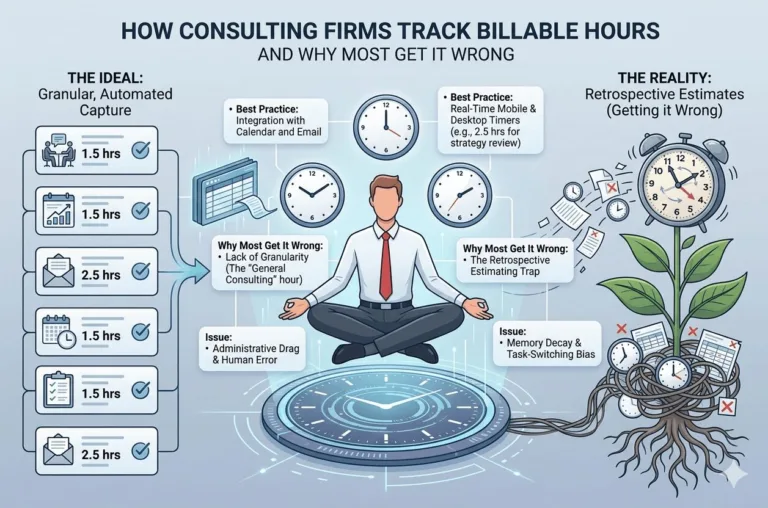
Consulting · Billing · Productivity How Consulting FirmsTrack Billable Hours(And Why Most Get It Wrong) ✍️ Bhavesh Choudhary 📅 May 2026 ⏱️ 8 min read Accurate billable hour tracking is the difference between a profitable and a struggling consulting firm. 40% of billable hours go untracked in most small consulting firms $50K+ average annual revenue lost to poor time tracking per consultant 3x more profitable firms that use dedicated time tracking systems You did the work. You delivered the strategy, attended the meetings, revised the deck three times. But when the invoice goes out — you’ve forgotten half of it. Sound familiar? For most consulting firms and freelance consultants, billable hour tracking is the leakiest part of the entire business. This article breaks down exactly how consulting firms track billable hours, what the best ones do differently, and how the right system can stop revenue from quietly walking out the door. Why Billable Hour Tracking Matters More Than You Think For any consulting firm — whether you’re a solo consultant or running a small agency — time is your product. Unlike selling physical goods, you can’t look at a shelf and count your inventory. Your inventory is hours, and if those hours aren’t tracked, they disappear forever. The consequences are more serious than most consultants admit: Revenue leakage — untracked hours mean uninvoiced work. You’ve already paid the cost (your time and energy) but never collected the revenue. Underpricing — without accurate data on how long projects actually take, you keep quoting flat fees that eat into your margins. Scope creep blindness — clients ask for “just one more thing” repeatedly, and without time logs, you have no data to push back with. Team mismanagement — for firms with multiple consultants, you can’t manage utilisation, capacity, or performance without accurate hour data. 💡 The 40% Rule Research consistently shows that consultants who rely on manual or end-of-day time logging miss up to 40% of their actual billable time. That’s not a rounding error — that’s nearly half your revenue. The 5 Ways Consulting Firms Track Billable Hours There’s no single right way — but there’s a clear spectrum from least to most effective. Here’s how different firms approach it: 1. Manual Timesheets (Spreadsheets) The most common and most error-prone method. Consultants fill in their hours at the end of the day or week from memory. Simple to set up but terrible for accuracy — human memory degrades fast and context-switching means hours go unlogged constantly. 2. Timer-Based Apps (Start/Stop Tracking) Tools like Toggl, Harvest, or Clockify let you start a timer when you begin a task and stop it when done. Much more accurate than manual entry, but only works if you actually remember to start and stop — which most people don’t consistently. 3. Project Management + Time Tracking Combos Firms using ClickUp, Asana, or Monday.com often log time directly against tasks. This is better because the time is attached to context — the specific deliverable, client, and project. But it requires discipline to maintain and often needs separate invoicing tools. 4. Dedicated Billing Software Tools like FreshBooks or QuickBooks have built-in time tracking tied directly to invoicing. Better for billing, but often siloed from day-to-day project management — so you end up juggling two separate systems again. 5. All-in-One Systems The most efficient approach. A single platform where project management, time tracking, team collaboration, and invoicing all live together. Hours logged against tasks flow directly into invoices — no manual reconciliation, no revenue falling through the cracks. The best consulting firms treat time data as business intelligence — not just billing records. What the Best Consulting Firms Do Differently After speaking with dozens of freelancers and small agency owners, a clear pattern emerges. The firms that are most profitable around billable hours share these habits: They track in real time, not at end of day. The moment a call ends or a task is completed, time is logged. Not at 6pm from memory. They attach time to clients and projects, not just generic “work.” This makes reporting, invoicing, and scope conversations effortless. They review utilisation weekly. Not just to invoice, but to understand which clients are eating disproportionate time vs. revenue. They use data to reprice. When a project consistently takes twice the estimated hours, they adjust future quotes — or have an evidence-based conversation about scope. They automate the invoice-to-billing pipeline. Hours logged become invoices with minimal manual work. The golden rule: If your time tracking system requires you to remember what you did, it will always be inaccurate. The best systems capture time as work happens — not after the fact. Comparing the Most Popular Time Tracking Approaches Method Accuracy Invoicing Project Context Cost / Complexity Manual Spreadsheet ❌ Low ❌ Manual ❌ None Free / Low Toggl / Clockify ✅ Medium ❌ Separate tool ✅ Basic Low / Medium Harvest ✅ Medium ✅ Built-in ✅ Good Medium ClickUp / Asana ✅ Medium ❌ Add-on needed ✅ Strong Medium / High Siddhify ⚡ ✅ High ✅ Built-in ✅ Full context Low — all-in-one How Siddhify Solves Billable Hour Tracking for Consultants Purpose-built for freelancers, solopreneurs, and small agencies who need everything in one place. ⏱️ Task-Level Time Tracking Log time directly against specific tasks and projects. Every hour has context — client, deliverable, and date — automatically. 🧾 Built-in Invoicing Turn logged hours into professional invoices in seconds. No reconciling between two separate tools ever again. 👥 Sub-User & Team Management Add team members, assign tasks, and track everyone’s billable hours across client projects from one dashboard. 🤖 AI-Powered Task Automation Siddhify’s AI helps break down projects, suggest time estimates, and flag when scope is creeping beyond your original quote. 💬 Client Conversations Keep all client communication in context with the project — no switching to Slack, email, and back again. ⚡ Gamified Productivity XP points, streaks, and Dream Score keep you and your team motivated — making consistent tracking feel rewarding, not like a
How Consulting FirmsTrack Billable Hours Read More »