

Top Frontend Cloud Collaboration Tools in 2026 (And How Siddhify Unifies Your Stack)

Distributed work is the default for frontend teams, with designers in Berlin, developers in Toronto, and freelancers joining from Bali. Even small digital agencies handle five projects with remote and hybrid teams.
Cloud collaboration tools enabled this shift, but they also introduced a new challenge:
Imagine a designer on a tight deadline bouncing between tools. She starts in Figma, jumps to Slack for clarification, checks GitHub to confirm the latest code, updates Jira, and gets pinged in Miro about a change from last night’s brainstorm.
By the time she returns to Figma, three hours have passed, and her main question is still unanswered.
Many teams deal with this problem: too many tools and not enough clarity.
6According to Zoom’s Workplace Collaboration Report (2026):
- 63% of workers waste time due to poor communication
- 64% lose three or more hours every week due to inefficient collaboration
Combine this with the typical set of frontend tools, and it’s clear why teams get burned out, miss deadlines, or forget to give feedback.
This guide is here to help you tackle that challenge.
What This Guide Covers
You’ll learn:
- What cloud-based frontend collaboration tools actually are
- Why they’re more important than ever in 2026
- The best cloud collaboration tools for frontend teams (by category)
- Pros, cons, pricing ranges, and real-world use cases
- Typical tool setups for agencies, startups, and product teams
- Workflow diagrams and examples
- Security and compliance basics for cloud workflows
- A step-by-step plan to get started
- Where most teams go wrong and how to fix it
- How Siddhify unifies everything into one daily command center
If you want the best cloud-based frontend collaboration software in 2026, this is the definitive guide.
Ready to improve your team’s workflow? Start by reviewing your current tools to spot any inefficiencies or overlaps.
Try using Siddhify to organize your projects, communication and coordination. Jump in and begin making your collaboration better today.
We’ll start by reviewing the essentials.
Experience the freedom of joining
Siddhify at no cost, always.
What Is Frontend Cloud Collaboration Software?
Frontend cloud collaboration software is any tool that lets developers, designers, and product teams work together at the same time, right in the browser, without needing to set up anything on their own computers.
These tools eliminate environment issues (“but it works on my machine”), simplify onboarding, streamline design-to-dev handoff, and make remote teamwork feel natural.
What Modern Frontend Teams Need From Cloud Collaboration Tools
Modern frontend teams need a few essential features. Which ones are you missing? Knowing this will help you get the most from the tips and comparisons below.
✔ 1. Real-Time Editing & Pair Programming
Live cursors, shared terminals, instant previews, collaborative debugging.
✔ 2. Smooth Design-to-Development Handoff
Tools like inspect mode, reusable design pieces, shared component libraries, and easy-to-download assets.
✔ 3. Version Control & Structured Code Review
Templates for code changes, ways to organize code versions, and comments right in the code.
✔ 4. Automated Deployments & Preview URLs
Automatic build and test systems, automated checks, and special links to preview changes.
✔ 5. Security & Governance
SOC 2, ISO 27001, GDPR compliance, SSO, audit logs.
With these features, teams work faster, communicate better, and don’t need to share their screens as often.

Why Cloud-Based Collaboration Matters More Than Ever in 2026
Let’s look at the main reasons more teams are using these tools.
Remote & Hybrid Are Now Standard — Not Exceptions
Gallup reports that 20% of the global workforce can work remotely 3–5 days a week without any loss in productivity.
Frontend development is especially suited to this:
- Everything runs in browsers
- Design is already cloud-first
- Git-based workflows are naturally async
- Tools like Codespaces and StackBlitz get rid of the time it takes to set things up
- Teams ship faster with remote-first rituals
When your workflow is cloud-based, onboarding new engineers is as simple as logging in and beginning to code.
The True Cost of Poor Collaboration
Zoom’s research uncovered tough numbers:
- 63% waste time from communication breakdowns
- 64% lose 3+ hours weekly due to collaboration inefficiency
- Using too many tools wastes about 6 hours per employee every week
- Teams that use more than 10 tools have the most trouble working smoothly
For frontend teams, this leads to:
- Delayed PRs
- Broken component libraries
- Design inconsistencies
- Duplicate work
- Missed handoffs
- Context-switch overload
- Burnout
In a competitive market, inefficiency can be very costly.
Market Trends Show Collaboration Is Now Core Infrastructure
According to Business Research Company, cloud collaboration software reached $18.2B in 2024, and the demand continues to rise.
Stack Overflow’s Developer Survey shows:
- 57.5% of developers use Jira for async collaboration and project tracking
- Git-based workflows remain the backbone of software delivery
- Cloud IDE adoption is climbing fast
Today, collaboration tools are an essential part of every team’s toolkit.
How Cloud Tools + Siddhify Reduce Friction
Cloud tools give you the basics. Siddhify gives you a way to organize your work.
Cloud Tools Provide:
- Instant dev environments
- Rapid onboarding
- Real-time collaboration
- Design and code that work together in one process
- AI-assisted coding
Siddhify Adds:
- Daily planning & time blocking
- Sprint workflows
- All decisions in one place
- Wellness and burnout prevention, plus stats and insights for you and your team.
- AI-driven planning
- Financial and time spent tracking
- Sticky notes, rewards, and team habits
Cloud tools help you get things built.

Top Frontend Cloud Collaboration Platforms in 2026 (By Category)
Category 1: Cloud IDEs & Collaborative Coding Tools
Cloud IDEs are the main tool for modern frontend teamwork because they:
- Remove local setup
- Provide shared dev environments
- Offer instant preview links
- Speed up onboarding
- Support pair programming
- Reduce “works on my machine” issues
Below is a full comparison of the top cloud IDEs for frontend teams in 2026.
StackBlitz runs Node.js directly in the browser using WebContainers meaning you get a full dev environment with zero setup.
Best For
- React, Vue, Svelte, Angular
- Component libraries
- Frontend-heavy teams
- Rapid prototyping
- Sharing reproducible examples
Key Advantages
- Loads instantly
- Lightning fast previews
- A safe, separate space to work
- Real-time collaboration
- Native-like browser performance
Limitations
- Limited backend support
- Not ideal for large monorepos
- Not a full IDE replacement for complex apps
Pricing (2026)
- Free tier available
- Team plans typically $9–$15/user/month
Real-World Example
Teams building design systems often use StackBlitz to preview components instantly, eliminating setup delays.
CodeSandbox is widely used for prototypes, live previews, small apps, and collaborative editing.
Best For
- Agencies sharing demos with clients
- Full-stack prototypes
- Product teams that need to make quick changes
Benefits
- GitHub integration
- Real-time co-editing
- Deployable sandboxes
- Powerful collaboration tools
A team developing an interactive learning app significantly improved their development efficiency with CodeSandbox’s live collaboration and CI integration.
By cutting the time to build their MVP by 40%, they were able to reallocate resources and enhance other project features without extending the deadline.
Pricing (2026)
- Free tier available
- Pro plans $9–$15/user/month
- Team workspace options available
If your team uses GitHub heavily (PRs, issues, projects, actions), Codespaces is a natural extension.
Best For
- Full product teams
- Large repos
- Teams using GitHub Actions
- Backend + frontend collaboration
- Reproducible dev environments
Strengths
- Full VS Code in the browser
- Dev containers for consistency
- Instant onboarding
- Secure cloud infrastructure
- Tight GitHub integration
Limitations
- Resource-heavy for very large monorepos
- More expensive than other options
Pricing (2026)
Usage-based:
- $0.18–$0.36/hour depending on compute
- Most teams spend $15–$50 per engineer per month
Replit is not frontend-specific, but it shines for quick experiments, teaching, workshops, and multiplayer coding.
Best For
- Freelancers
- Students
- Prototyping
- Collaborative learning
- Side projects
Pros
- Multiplayer mode
- Very easy onboarding
- Huge community
- Supports many languages
Cons
- Not purpose-built for professional frontend teams
- Limited for large-scale production apps
Pricing (2026)
- Free tier
- Hacker plan ~$10/month
- Team plans available
Comparison Table: Best Cloud IDEs for Frontend Teams (2026)
Tool | Best For | Pros | Cons | Price |
StackBlitz | Pure frontend work, component libraries | Instant load, WebContainers | Limited backend | Free–$15/user |
CodeSandbox | Prototypes, demos, client work | Great sharing, live previews | Not ideal for huge repos | Free–$15/user |
Codespaces | GitHub-native workflows | Full VS Code, dev containers | Higher cost | Usage-based |
Replit | Learning, quick experiments | Multiplayer coding | Not frontend-specific | Free–$10+ |
Category 2: Real-Time Code Collaboration & Pair Programming
Frontend teams often work together on code, fix problems, and solve issues quickly. Real-time collaboration tools let developers work together without needing to share their screens.
Live Share enables two or more developers to collaborate inside the same VS Code session.
Best For
- Code reviews
- Debugging sessions
- Remote pairing
- Interviews
- Onboarding
Strengths
- Shared terminals
- Shared servers
- Real-time edits
- Low latency
- Works with Codespaces or local VS Code
Limitations
- Does not replace a full cloud coding tool
- Needs VS Code to be set up
Pricing
- Free
Category 3: Design & Frontend Handoff Tools
Frontend teamwork does not work well without easy ways for designers and developers to work together. These tools help fix that.
Figma is the global leader for UI/UX collaboration.
Strengths
- Real-time editing
- Robust component libraries
- Easy handoff to developers
- Plugins for tokens, annotations, exports
- Collaboration-friendly
Case Studies
- Vanguard cut design workflow time by up to 50% with Figma
- On (sportswear brand) streamlined cross-functional digital experiences
- (Source: Figma Customer Stories / Affirma Consulting)
Pricing
- Free plan
- Professional: $12–$15/editor/month
- Organization: $45/editor/month
Ideal for:
- Whiteboarding
- User journeys
- Design critiques
- Sprint planning
- Product workshops
Penpot is useful for companies that require open-source stacks or self-hosting.
Category 4: Code Hosting & Review Platforms
GitHub remains the dominant platform for code hosting and collaboration.
Pros
- Industry-standard PR workflow
- Large ecosystem
- Codespaces + Actions integration
- Excellent documentation
Pricing
- Free for public repos
- Teams: ~$4/user/month
- Enterprise: $21/user/month
GitLab offers:
- CI/CD
- Cloud-native deployments
- Security scanning
- Self-hosting options
Best For
Engineering organizations with strict compliance needs.
If your company uses Jira heavily, Bitbucket is a natural fit.
Category 5: Project Management Tools for Frontend Teams
These tools help teams stay aligned and deliver work consistently.
Used by 57.5% of developers.
Pros
- Deep customization
- Enterprise-ready
- Integrations with everything
Cons
- Can feel heavy for small teams
Pros
- Minimalist
- Blazing fast
- Great for engineering/product squads
Great for
- Designers
- Marketers
- Digital Agencies
- Cross-functional teams
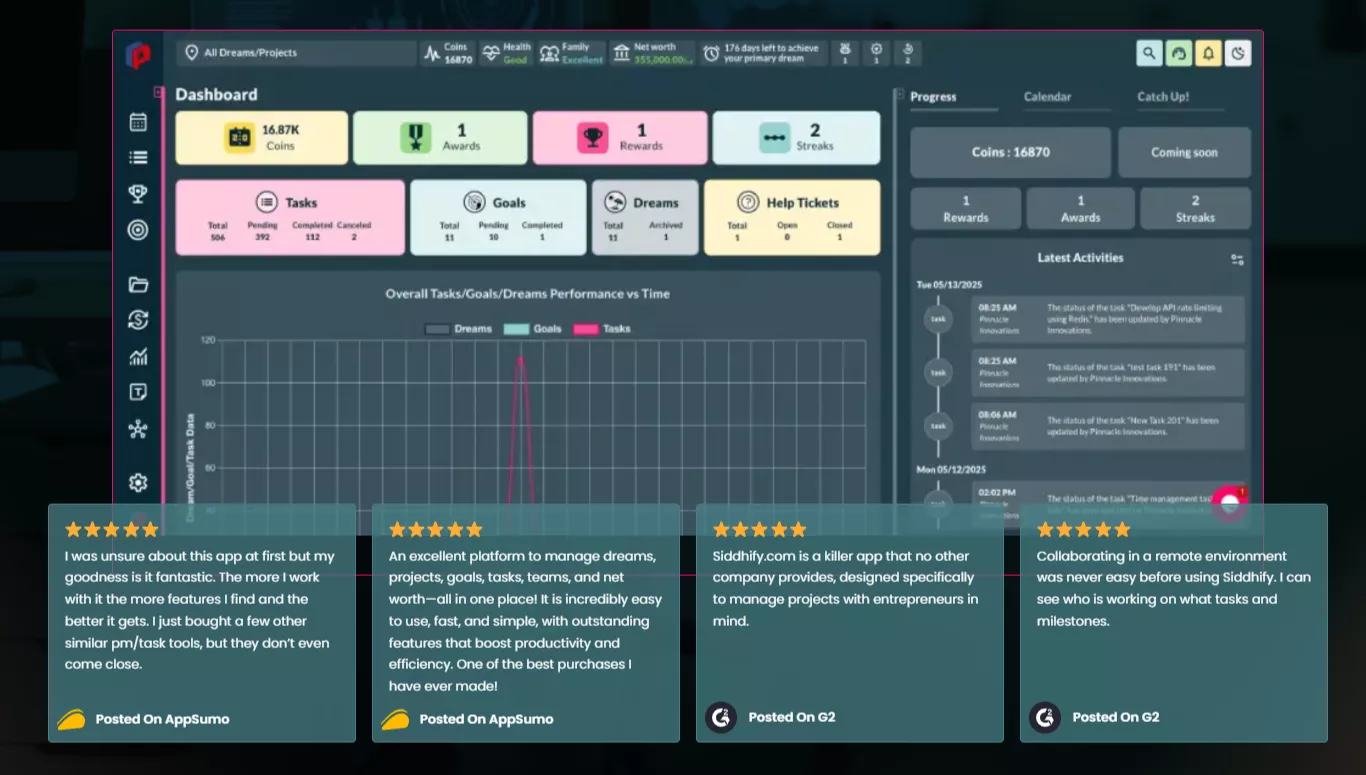
Pricing
- Free forever plan available
- “3 months off” for Digital and Web agencies
Category 6: Visual QA, Feedback & Client Review Tools
These tools speed up approvals and reduce back-and-forth.
Best For
- Digital agencies
- Freelancers
- QA testers
Strengths
- Pin comments on live websites
- Track changes
- Manage fixes
- Create task lists
Great for early-phase thinking:
- Wireframes
- User journeys
- Architecture sketches
- Brainstorming
People Also Ask Section
What is a cloud-based frontend collaboration tool?
A cloud-based frontend collaboration tool helps developers and designers work together in real time using browser-based environments, design platforms, and shared workspaces.
What is a cloud-based frontend collaboration tool?
A cloud-based frontend collaboration tool helps developers and designers work together in real time using browser-based environments, design platforms, and shared workspaces.
Which cloud IDE is best for frontend development?
StackBlitz is best for pure frontend development, CodeSandbox for prototypes, and GitHub Codespaces for teams working inside GitHub.
How do designers and developers collaborate in the cloud?
They use tools like Figma, Webvizio, GitHub, and Siddhify to share designs, link tasks, preview components, and track progress in real time.
What tools do frontend teams use for collaboration?
Most teams use Figma, GitHub, StackBlitz or Codespaces, Jira or Linear, Webvizio, Slack, and a workflow orchestrator like Siddhify.
How do I reduce collaboration overload in my dev team?
Limit tools, use a unified planning hub like Siddhify, standardize rituals, and link designs, tasks, and PRs in one place.

Siddhify: The Operating System for Your Frontend Collaboration Stack
By now, you’ve seen the landscape:
Frontend teams use lots of tools.
- Designers → Figma
- Devs → GitHub, StackBlitz, CodeSandbox, Codespaces
- PMs → Linear or Jira
- Agencies → Webvizio
- Founders → Slack or Teams
- QA → Miro / FigJam
- Notes → Notion or Google Docs
- Time → Harvest / Toggl
It works, but everything is scattered.
Over time, fragmentation leads to:
- Missed deadlines
- Lost context
- Design drift
- Overlapping tasks
- Duplicate work
- Messy prioritization
- Unclear ownership
- Stress and burnout
Teams don’t need more tools. They need a single source of truth that brings everything together. That’s where Siddhify comes in.
Experience the freedom of joining
Siddhify at no cost, always.
How Siddhify Sits on Top of Your Stack
Siddhify doesn’t replace your tools.
It helps organize and connect them. Think of your collaboration stack like a brain:
- Figma → visual cortex
- GitHub → logic and code
- StackBlitz / Codespaces → action
- Webvizio → sensory input
- Linear/Jira → memory
- Slack/Teams → communication signals
Siddhify acts like the prefrontal cortex, handling planning, prioritization, focus, and decision-making.
Here’s what that looks like.
✔️ Unified Daily Planning
Plan your day in one place:
- Time blocking
- Pomodoro
- Daily goals
- Priority slots
- Sticky notes
- Micro-rituals (focus, gratitude, reflection)
Everything that happens in Figma, GitHub, or your IDE rolls into your daily plan.
✔️ Task Linking Across Your Entire Stack
Siddhify lets you link:
- Figma frames
- GitHub PRs
- Preview URLs from StackBlitz or CodeSandbox
- Linear or Jira tickets
- Webvizio bug pins
- Client feedback
You no longer ask:
“Where is that file?”
“Where’s the PR for this task?”
“Which design is this based on?”
“Where was the client comment?”
It’s all right there, in one place.
✔️ Sprint Workflows
Unlike generic task apps, Siddhify gives you:
- Sprint cycles
- Ritual templates
- Team or solo modes
- Backlog grooming
- Standup automation
- Retro automation
- Cycle time insights
If you’re a solo founder or freelancer, you get the lightweight version.
If you’re a team, you get the collaborative version.
✔️ Wellness & Burnout Prevention
Frontend work is mentally heavy. Siddhify supports:
- Energy check-ins
- Stress patterns
- Micro-break reminders
- Mood tracking
- Workload balance analytics
Companies adopting Siddhify report significantly lower burnout because teams can see their workload visually and better manage it.
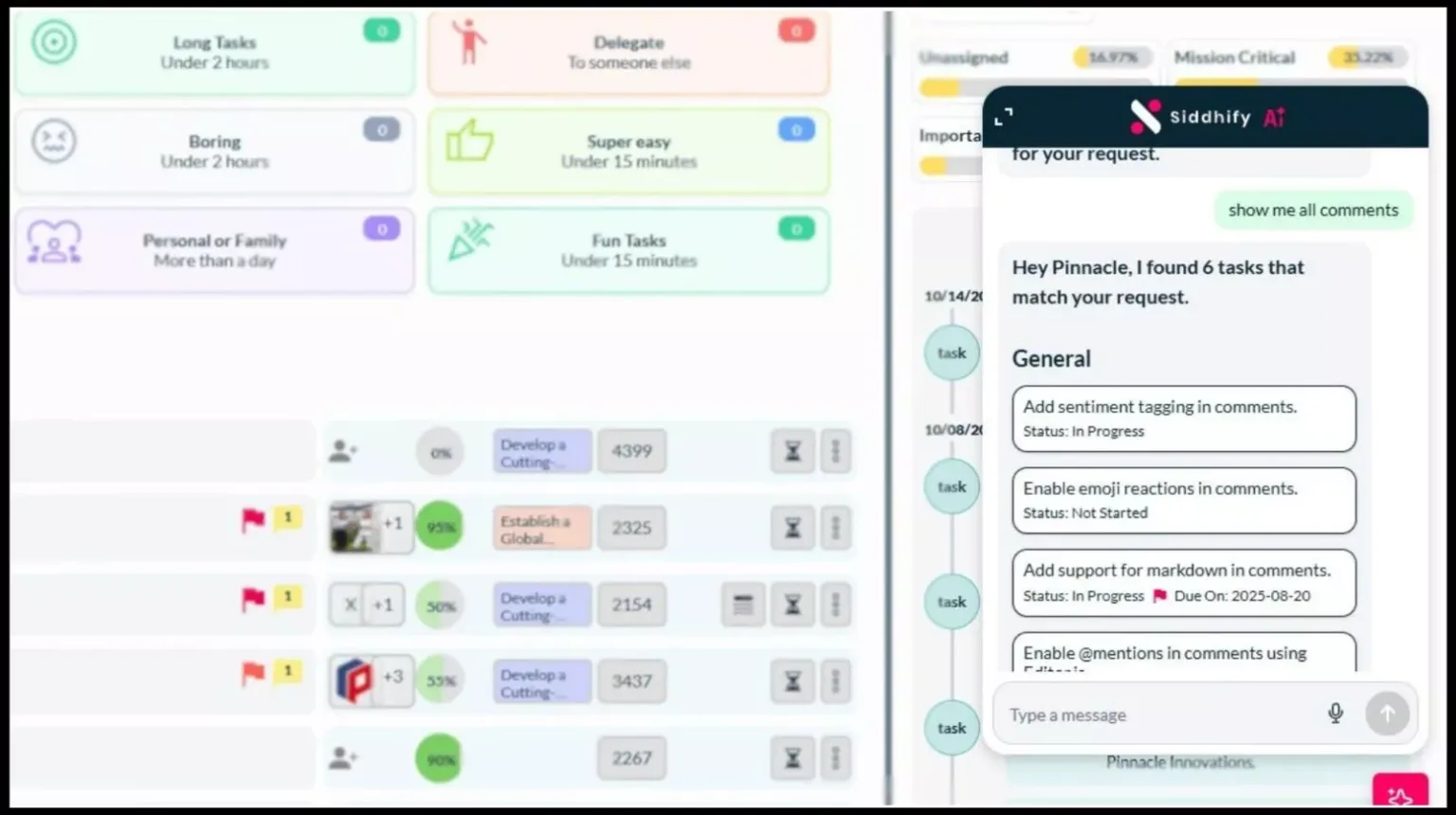
Siddhify tasks dashboard with an AI assistant
✔️ AI Assistant Built for Your Workflow
Siddhify’s AI uses your linked tasks, designs, and PRs to help you:
- Plan your week
- Structure sprints
- Prioritize tasks
- Break down features
- Identify blockers
- Estimate timelines
- Document decisions
- Generate standup updates
This is not generic AI. It is contextual AI.
✔️ Finance, Net Worth, Personal Management
A unique advantage:
Siddhify is also your life planner, not just a work tool.
- Personal budgets
- Net worth dashboards
- Financial goals
- Dream trackers
- Habit systems
- Achievement journals
This matters because:
Frontend Collaboration Stack Archetypes (2026)
1. Design-Led Product Team (B2B SaaS)
Tools:
Figma + FigJam + GitHub + StackBlitz + Siddhify
Why this works:
- Fast experimentation
- Smooth design-to-dev workflows
- Rapid PR cycles
KPIs to track:
- Time from design sign-off → merged PR
- Cycle time
- Preview link turnaround
2. Remote Agency
Tools:
Figma + Webvizio + CodeSandbox + GitHub + Siddhify
Why this works:
- Clean client communication
- Visual QA
- Real-time prototype sharing
KPIs:
- Client approval turnaround time
- Bug resolution speed
- Rework hours per week
3. Lean Startup Squad
Tools:
Codespaces + Live Share + Linear/Jira + Siddhify
Why this works:
- Rapid feature development
- Onboarding new hires in minutes
- Tight sync between PM + engineering
KPIs:
- Time to first contribution
- Story throughput per sprint
- PR review turnaround

Security, Compliance & Governance for Frontend Collaboration
AI cloud tools carry real responsibility. Teams must take security seriously.
Non-Negotiable Security Standards
Every tool you choose should support:
- Encryption at rest & in transit
- Role-based access control (RBAC)
- Audit trails
- SSO (Okta, Google, Azure)
- Backups & redundancy
Certifications to Look For
Ideal tools should comply with:
- SOC 2
- ISO 27001
- GDPR
- PCI DSS (if handling payments)
Avoid tools without these certifications for enterprise or regulated clients.
Practical Security Checklist
You should be able to answer:
Who has repo access?
Who can merge PRs?
Are designs stored securely?
Are CI/CD secrets encrypted?
Is sensitive data uploaded to cloud IDEs?
Is access removed when contractors leave?
Additionally, consider asking: Who on your team owns each item?
Assigning ownership can ensure responsibility and drive teams to actively manage and complete each task. This checklist is strong for featured snippets too.

Implementation Roadmap: Rolling Out Your Collaboration Stack
Most teams adopt tools randomly.
Smart teams use a structured rollout plan.
Phase 1: Audit & Simplify
List every tool used.
Cut anything duplicated.
Zoom’s research proves:
More tools = more friction.
Phase 2: Pilot a Stack (4–6 Weeks)
Run a controlled experiment.
Measure:
- Cycle time
- Bug resolution time
- PR turnaround
- Preview link creation time
Phase 3: Standardize Rituals in Siddhify
Use Siddhify templates for:
- Standups
- Sprint Planning
- Retros
- Onboarding
- Weekly reviews
This makes things much less chaotic.
Phase 4: Scale Across Teams
Roll your stack out company-wide.
Use Siddhify as your system of record.
Common Mistakes Frontend Teams Make With Cloud Collaboration (And How to Fix Them)
These mistakes recur across dev teams, agencies, and startups.
Mistake #1: Too Many Tools in the Stack
The biggest productivity killer is tool overload.
Symptoms
- PMs use Jira
- Designers use Figma
- QA uses Webvizio
- Devs use GitHub + Codespaces
- Founders use Slack
- Notes in Notion
- Tasks trapped in multiple places
This leads to silos, inconsistent workflows, and information loss.
Fix
Consolidate the workflow in Siddhify so all tasks, PRs, designs, feedback, and sprint processes come together in one place.
Mistake #2: Weak Design → Development Handoffs
Teams underestimate how much handoff friction slows releases.
Symptoms
- Missing design specs
- Outdated components
- Devs coding from screenshots
- Designers are unaware of implementation issues
Fix
Use structured workflows:
- Link Figma frames → tasks in Siddhify
- Use inspect mode
- Implement design tokens
- Keep libraries updated
- Use PR templates for UI changes
Mistake #3: No Clear Source of Truth
Teams scatter planning across:
- Slack
- Google Docs
- Jira
- GitHub
- Notion
Fix
Establish a single system of record: Siddhify.
If the team asks, “Where is X?”, that’s a process bug.
Mistake #4: Ignoring Security & Compliance
Frontend teams often forget:
- Access controls
- Repo permissions
- PR audits
- Design data governance
- Compliance requirements
Fix
Use tools that are SOC 2, ISO 27001, and GDPR-compliant.
Set automated access and offboarding policies.
Mistake #5: Not Measuring Anything
You can’t improve what you don’t measure.
Fix
Track 3–5 KPIs consistently:
- Cycle time
- PR review times
- Time-to-first-contribution
- Bug resolution time
- Client approval turnaround
Siddhify auto-generates these insights.
FAQ: Frontend Cloud Collaboration Tools (2026 Edition)
A cloud IDE runs in the browser with no local setup, while a local IDE runs on your machine. Cloud IDEs offer better onboarding, collaboration, and reproducibility.
StackBlitz and CodeSandbox are ideal for React and Next.js because they support instant previews, WebContainers, and real-time collaboration.
Live Share is perfect for pair programming but not a full replacement for cloud IDEs. It works best alongside Codespaces or a traditional local environment.
- StackBlitz → Instant frontend dev
- CodeSandbox → Prototypes & client-facing demos
- Codespaces → GitHub workflows, large repos, enterprise teams
Yes, as long as they support SOC 2, ISO 27001, GDPR, and proper access controls.
Figma + Webvizio + GitHub + CodeSandbox + Siddhify.
This setup simplifies client approvals and accelerates delivery.
Use fewer tools, set clear workflows, and adopt Siddhify as your planning + coordination hub.
Not yet, but for frontend work, cloud IDEs are rapidly becoming the default, especially in distributed teams.
Siddhify is specifically built to reduce context switching by unifying tasks, PRs, previews, and designs in one place.
Map your workflows, pick tools that support design, code, feedback, and planning, then use Siddhify to keep everything organized.
Cycle time, PR reviews, handoff delays, bug resolution time, and client approval speed.

Choose the Right Cloud Tools, Then Let Siddhify Bring Them Together
Frontend teams in 2026 work in a cloud-first world.
Design happens in Figma, code lives in GitHub, prototypes run in StackBlitz or CodeSandbox, and communication flows through Slack or Teams.
These AI cloud tools help teams move faster, but they also create chaos when used without a clear orchestration layer.
The best frontend collaboration stacks don’t rely on more software. They rely on better coordination, tighter workflows, and a single source of truth.
That’s where Siddhify steps in
Siddhify unifies your tools, tasks, sprints, and focus into a single daily home screen.
Whether you’re an agency handling multiple clients, a startup shipping weekly releases, or a freelancer balancing work and life, Siddhify helps you work clearly, reduce friction, and avoid burnout.
Choose the cloud tools that fit your needs. Then let Siddhify bring everything together so your team can focus on the work that matters.
What is the first workflow you will unify in Siddhify this week? Making a specific commitment helps you get started.

About the Author
Experience the freedom of joining
Siddhify at no cost, always.
Top Frontend Cloud Collaboration Tools in 2026 (And How Siddhify Unifies Your Stack)
- What This Guide Covers
- What Is Frontend Cloud Collaboration Software?
- Why Cloud-Based Collaboration Matters More Than Ever in 2026
- Top Frontend Cloud Collaboration Platforms in 2026 (By Category)
- Comparison Table: Best Cloud IDEs for Frontend Teams (2026)
- Category 2: Real-Time Code Collaboration & Pair Programming
- Category 3: Design & Frontend Handoff Tools
- Category 4: Code Hosting & Review Platforms
- Category 5: Project Management Tools for Frontend Teams
- Category 6: Visual QA, Feedback & Client Review Tools
- People Also Ask Section
- Siddhify: The Operating System for Your Frontend Collaboration Stack
- How Siddhify Sits on Top of Your Stack
- Frontend Collaboration Stack Archetypes (2026)
- Security, Compliance & Governance for Frontend Collaboration
- Implementation Roadmap: Rolling Out Your Collaboration Stack
- Common Mistakes Frontend Teams Make With Cloud Collaboration (And How to Fix Them)
- FAQ: Frontend Cloud Collaboration Tools (2026 Edition)
- Choose the Right Cloud Tools, Then Let Siddhify Bring Them Together